Showing posts with label Delphi. Show all posts

Monday, April 16, 2012

FireMonkey Development Setup for iOS: Delphi XE2 Update 4

Introduction

This topic shows how to setup FireMonkey Development environment for iOS – Apple’s mobile device platform for iPhone, iPAD or iPod touch.

To continue installation, Xcode 4.2 should be ready in Mac OS X machine.

Install FireMonkey – iOS SDK

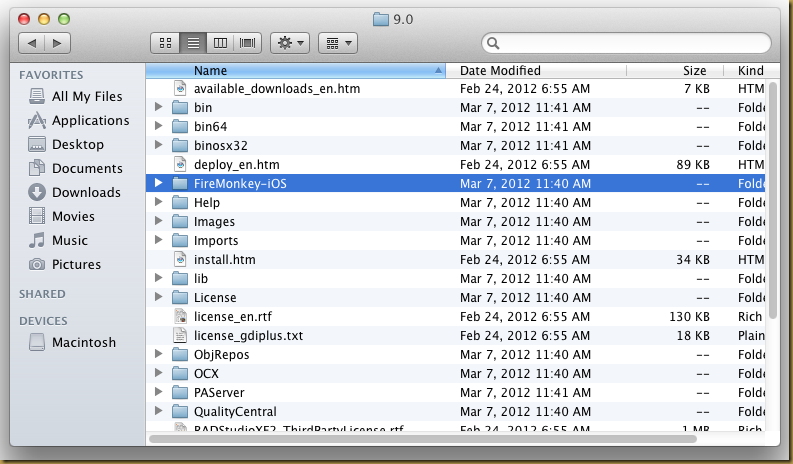
The FireMonkey iOS SDK is available in Delphi XE2 folder FireMonkey-iOS.  The following folder is a shared folder from VMware machine: %ProgramFiles(x86)\Embarcadero\RAD Studio\9.0:

Screen Shot 2012-04-14 at 9.59.25 AM

Locate FireMonkey-iOS.dmg disk image in the folder:

Screen Shot 2012-04-14 at 9.59.38 AM

Open or mount the disk image:

Screen Shot 2012-04-14 at 9.59.49 AM

Install both packages in the following sequence:

  1. fpc-2.6.0.intel-macosx.pkg
  2. FireMonkey-iOS-XE2.pkg

A new folder: Embarcadero should be created in Developer folder:

Screen Shot 2012-04-14 at 10.12.39 AM

The FireMonkey iOS SDK is ready for Xcode to compile FireMonkey iOS project now.

Reference

  1. FireMonkey Development Setup for iOS. URL: http://docwiki.embarcadero.com/RADStudio/en/FireMonkey_Development_Setup_for_iOS

Sunday, February 21, 2010

When not to use DoubleBuffered

As according to Delphi’s help,

DoubleBuffered determines whether the control's image is rendered directly to the window or painted to an in-memory bitmap first.

When DoubleBuffered is false, the windowed control paints itself directly to the window. When DoubleBuffered is true, the windowed control paints itself to an in-memory bitmap that is then used to paint the window. Double buffering reduces the amount of flicker when the control repaints, but is more memory intensive.

However, not all VCL’s controls work nice with DoubleBuffered.  There are at least 2 controls that I am aware of that can’t work with DoubleBuffered and would mess up visually.

These two controls are TRichEdit and TToolBar.  Any controls that are family of these 2 controls will mostly show expected outcome if using with DoubleBuffered.

You would probably not able to type text visually with TRichEdit if DoubleBuffered is True.  For TToolBar, it would show black background.  However, you may always place TToolBar in TPanel control to get rid of the DoubleBuffered nightmare.

Reference:

  1. Delphi on line help topic: Controls.TWinControl.DoubleBuffered. URL: http://docwiki.embarcadero.com/VCL/en/Controls.TWinControl.DoubleBuffered

Wednesday, December 02, 2009

TxQuery 2.0

TxQuery is created and owned by Alfonso Moreno.  He has stopped the development of TxQuery for years.  However, there are many Delphi developers still using TxQuery.  A barrier for TxQuery migrating to Delphi 2009 and 2010 is the introduction of Unicode.

I contact Alfonso Moreno on Nov 17, 2009 to ask if he may consider make TxQuery open source and let this great product continue enhanced by the Delphi community.  He finally agree and I wish to say big "Thank You" for his contribution.

I have attempted to patch the source code to make it compile and work with Delphi Unicode.  Test cases has been created to make sure it works as expected.  I know there are other cases that I didn't cover yet, just alert me promptly.  You are also welcome to join the maintenance and enhancement for this project.

TxQuery component is a TDataSet descendant component that can be used to query one or more TDataSet descendant components using SQL statements. It is implemented in Delphi 100% source code, no DLL required, because it implements its own SQL syntax parser and SQL engine.

It can be very useful for TDataSet descendants components (including TClientDataSet) that do not use the BDE and that do not implement the SQL language or to mix tables types (dbase, paradox, access).

TxQuery Project Page: https://code.google.com/p/txquery/
TxQuery Group: http://groups.google.com/group/txquery

Wednesday, October 14, 2009

DataSnap: In-Process Server Method

DataSnap Server Method was introduced in Delphi 2009.  Most video or demo about DataSnap server method available only introduce socket based client server access communication. e.g.: TCP or HTTP protocol.
However, DataSnap was designed as a scalable data access solution that able to work with one, two, three or more tiers model.  All examples we see so far are suitable for 2 or 3 tiers design.  I can’t find any example talking about 1 tier or in-process design.
Indeed, it is very simple to work with in-process server method.  Most steps are similar to out-of-process server methods.

Define a Server Method

Define a well known EchoString() and a Sum() server method:
unit MyServerMethod;
interface
uses Classes, DBXCommon;
type
  {$MethodInfo On}
  TMyServerMethod = class(TPersistent)
  public
    function EchoString(Value: string): string;
    function Sum(const a, b: integer): integer; 
  end;
  {$MethodInfo Off}

implementation
function TMyServerMethod.EchoString(Value: string): string;
begin
  Result := Value;
end;

function TMyServerMethod.Sum(const a, b: integer): integer;
begin
  Result := a + b;
end;

end.

Define a DataModule to access the server method

Drop a TDSServer and TDSServerClass as usual to the data module.  Define a OnGetClass event to TDSServerClass instance.  Please note that you don’t need to drop any transport components like TDSTCPServerTransport or TDSHTTPServer as we only want to consume the server method for in-process only.
object MyServerMethodDataModule1: TMyServerMethodDataModule
  OldCreateOrder = False
  Height = 293
  Width = 419
  object DSServer1: TDSServer
    AutoStart = True
    HideDSAdmin = False
    Left = 64
    Top = 40
  end
  object DSServerClass1: TDSServerClass
    OnGetClass = DSServerClass1GetClass
    Server = DSServer1
    LifeCycle = 'Server'
    Left = 64
    Top = 112
  end
end


unit MyServerMethodDataModule;
uses MyServerMethod;
procedure TMyServerMethodDataModule.DSServerClass1GetClass(DSServerClass: TDSServerClass;
    var PersistentClass: TPersistentClass);
begin
  PersistentClass := TMyServerMethod;
end;

Generate Server Method Client Classes

It is not easy to generate the server method client classes design for in-process server.  You may try any methods you are familiar with to hook up your server method to TCP or HTTP transport service, start the service and attempt to generate the client class by any means.
//
// Created by the DataSnap proxy generator.
//

unit DataSnapProxyClient;
interface
uses DBXCommon, DBXJSON, Classes, SysUtils, DB, SqlExpr, DBXDBReaders;
type
  TMyServerMethodClient = class
  private
    FDBXConnection: TDBXConnection;
    FInstanceOwner: Boolean;
    FEchoStringCommand: TDBXCommand;
  public
    constructor Create(ADBXConnection: TDBXConnection); overload;
    constructor Create(ADBXConnection: TDBXConnection; AInstanceOwner: Boolean); overload;
    destructor Destroy; override;
    function EchoString(Value: string): string;
    function Sum(const a, b: integer): integer;
  end;

implementation
function TMyServerMethodClient.EchoString(Value: string): string;
begin
  if FEchoStringCommand = nil then
  begin
    FEchoStringCommand := FDBXConnection.CreateCommand;
    FEchoStringCommand.CommandType := TDBXCommandTypes.DSServerMethod;
    FEchoStringCommand.Text := 'TMyServerMethod.EchoString';
    FEchoStringCommand.Prepare;
  end;
  FEchoStringCommand.Parameters[0].Value.SetWideString(Value);
  FEchoStringCommand.ExecuteUpdate;
  Result := FEchoStringCommand.Parameters[1].Value.GetWideString;
end;

function TMyServerMethodClient.Sum(a: Integer; b: Integer): Integer;
begin
  if FSumCommand = nil then
  begin
    FSumCommand := FDBXConnection.CreateCommand;
    FSumCommand.CommandType := TDBXCommandTypes.DSServerMethod;
    FSumCommand.Text := 'TMyServerMethod.Sum';
    FSumCommand.Prepare;
  end;
  FSumCommand.Parameters[0].Value.SetInt32(a);
  FSumCommand.Parameters[1].Value.SetInt32(b);
  FSumCommand.ExecuteUpdate;
  Result := FSumCommand.Parameters[2].Value.GetInt32;
end;

constructor TMyServerMethodClient.Create(ADBXConnection: TDBXConnection);
begin
  inherited Create;
  if ADBXConnection = nil then
    raise EInvalidOperation.Create('Connection cannot be nil.  Make sure the connection has been opened.');
  FDBXConnection := ADBXConnection;
  FInstanceOwner := True;
end;

constructor TMyServerMethodClient.Create(ADBXConnection: TDBXConnection; AInstanceOwner: Boolean);
begin
  inherited Create;
  if ADBXConnection = nil then
    raise EInvalidOperation.Create('Connection cannot be nil.  Make sure the connection has been opened.');
  FDBXConnection := ADBXConnection;
  FInstanceOwner := AInstanceOwner;
end;

destructor TMyServerMethodClient.Destroy;
begin
  FreeAndNil(FEchoStringCommand);
  inherited;
end;

end.

Invoke the server method via in-process

You may see from the following code that there is no different to access the server method for in-process and out-of-process design.
First, you create an instant of datasnap server.  This will register the DSServer to the TDBXDriverRegistry.  e.g. DSServer1 in this case.
You may then use TSQLConnection with DSServer1 as driver name instead of “DataSnap” that require socket connection to initiate in-process communication invoking the server method.
var o: TMyServerMethodDataModule;
    Q: TSQLConnection;
    c: TMyServerMethodClient;
begin
  o := TMyServerMethodDataModule.Create(Self);   Q := TSQLConnection.Create(Self);
  try
    Q.DriverName := 'DSServer1';     Q.LoginPrompt := False;
    Q.Open;

    c := TMyServerMethodClient.Create(Q.DBXConnection);
    try
      ShowMessage(c.EchoString('Hello'));
    finally
      c.Free;
    end;

  finally
    o.Free;
    Q.Free;
  end;
end;

Troubleshoot: Encounter Memory Leak after consume the in-process server methods

This happens in Delphi 2010 build 14.0.3513.24210.  It may have fixed in future release.  You may check QC#78696 for latest status.  Please note that you need to add “ReportMemoryLeaksOnShutdown := True;” in the code to show the leak report.
1
The memory leaks has no relation with in-process server methods.  It should be a problem in class TDSServerConnection where a property ServerConnectionHandler doesn’t free after consume.
Here is a fix for the problem:
unit DSServer.QC78696;
interface
implementation
uses SysUtils,
     DBXCommon, DSServer, DSCommonServer, DBXMessageHandlerCommon, DBXSqlScanner,
     DBXTransport,
     CodeRedirect;

type
  TDSServerConnectionHandlerAccess = class(TDBXConnectionHandler)
    FConProperties: TDBXProperties;
    FConHandle: Integer;
    FServer: TDSCustomServer;
    FDatabaseConnectionHandler: TObject;
    FHasServerConnection: Boolean;
    FInstanceProvider: TDSHashtableInstanceProvider;
    FCommandHandlers: TDBXCommandHandlerArray;
    FLastCommandHandler: Integer;
    FNextHandler: TDBXConnectionHandler;
    FErrorMessage: TDBXErrorMessage;
    FScanner: TDBXSqlScanner;
    FDbxConnection: TDBXConnection;
    FTransport: TDSServerTransport;
    FChannel: TDbxChannel;
    FCreateInstanceEventObject: TDSCreateInstanceEventObject;
    FDestroyInstanceEventObject: TDSDestroyInstanceEventObject;
    FPrepareEventObject: TDSPrepareEventObject;
    FConnectEventObject: TDSConnectEventObject;
    FErrorEventObject: TDSErrorEventObject;
    FServerCon: TDSServerConnection;
  end;

  TDSServerConnectionPatch = class(TDSServerConnection)
  public
    destructor Destroy; override;
  end;

  TDSServerDriverPatch = class(TDSServerDriver)
  protected
    function CreateConnectionPatch(ConnectionBuilder: TDBXConnectionBuilder): TDBXConnection;
  end;

destructor TDSServerConnectionPatch.Destroy;
var o: TDSServerConnectionHandlerAccess;
begin
  inherited Destroy;
  o := TDSServerConnectionHandlerAccess(ServerConnectionHandler);
  if o.FServerCon = Self then begin
    o.FServerCon := nil;
    ServerConnectionHandler.Free;
  end;
end;

function TDSServerDriverPatch.CreateConnectionPatch(
  ConnectionBuilder: TDBXConnectionBuilder): TDBXConnection;
begin
  Result := TDSServerConnectionPatch.Create(ConnectionBuilder);
end;

var QC78696: TCodeRedirect;
initialization
  QC78696 := TCodeRedirect.Create(@TDSServerDriverPatch.CreateConnection, @TDSServerDriverPatch.CreateConnectionPatch);
finalization
  QC78696.Free;
end.

Troubleshoot: Encounter "Invalid command handle" when consume more than one server method at runtime for in-process application

This happens in Delphi 2010 build 14.0.3513.24210.  It may have fixed in future release.  You may check QC#78698 for latest status.
To replay this problem, you may consume the server method as:
    c := TMyServerMethodClient.Create(Q.DBXConnection);
    try
      ShowMessage(c.EchoString('Hello'));
      ShowMessage(IntToStr(c.Sum(100, 200)));
    finally
      c.Free;
    end;

or this:
    c := TMyServerMethodClient.Create(Q.DBXConnection);
    try
      ShowMessage(c.EchoString('Hello'));
      ShowMessage(IntToStr(c.Sum(100, 200)));
      ShowMessage(c.EchoString('Hello'));
    finally
      c.Free;
    end;

Here is a fix for the problem
unit DSServer.QC78698;
interface
implementation
uses SysUtils, Classes,
     DBXCommon, DBXMessageHandlerCommon, DSCommonServer, DSServer,
     CodeRedirect;

type
  TDSServerCommandAccess = class(TDBXCommand)
  private
    FConHandler: TDSServerConnectionHandler;
    FServerCon: TDSServerConnection;
    FRowsAffected: Int64;
    FServerParameterList: TDBXParameterList;
  end;

  TDSServerCommandPatch = class(TDSServerCommand)
  private
    FCommandHandle: integer;
    function Accessor: TDSServerCommandAccess;
  private
    procedure ExecutePatch;
  protected
    procedure DerivedClose; override;
    function DerivedExecuteQuery: TDBXReader; override;
    procedure DerivedExecuteUpdate; override;
    function DerivedGetNextReader: TDBXReader; override;
    procedure DerivedPrepare; override;
  end;

  TDSServerConnectionPatch = class(TDSServerConnection)
  public
    function CreateCommand: TDBXCommand; override;
  end;

  TDSServerDriverPatch = class(TDSServerDriver)
  private
    function CreateServerCommandPatch(DbxContext: TDBXContext; Connection:
        TDBXConnection; MorphicCommand: TDBXCommand): TDBXCommand;
  public
    constructor Create(DBXDriverDef: TDBXDriverDef); override;
  end;

constructor TDSServerDriverPatch.Create(DBXDriverDef: TDBXDriverDef);
begin
  FCommandFactories := TStringList.Create;
  rpr;
  InitDriverProperties(TDBXProperties.Create);
  // '' makes this the default command factory.
  //
  AddCommandFactory('', CreateServerCommandPatch);
end;

function TDSServerDriverPatch.CreateServerCommandPatch(DbxContext: TDBXContext;
    Connection: TDBXConnection; MorphicCommand: TDBXCommand): TDBXCommand;
var
  ServerConnection: TDSServerConnection;
begin
  ServerConnection := Connection as TDSServerConnection;
  Result := TDSServerCommandPatch.Create(DbxContext, ServerConnection, TDSServerHelp.GetServerConnectionHandler(ServerConnection));
end;

function TDSServerCommandPatch.Accessor: TDSServerCommandAccess;
begin
  Result := TDSServerCommandAccess(Self);
end;

procedure TDSServerCommandPatch.DerivedClose;
var
  Message: TDBXCommandCloseMessage;
begin
  Message := Accessor.FServerCon.CommandCloseMessage;
  Message.CommandHandle := FCommandHandle;
  Message.HandleMessage(Accessor.FConHandler);
end;

function TDSServerCommandPatch.DerivedExecuteQuery: TDBXReader;
var
  List: TDBXParameterList;
  Parameter: TDBXParameter;
  Reader: TDBXReader;
begin
  ExecutePatch;
  List := Parameters;
  if (List <> nil) and (List.Count > 0) then
  begin
    Parameter := List.Parameter[List.Count - 1];
    if Parameter.DataType = TDBXDataTypes.TableType then
    begin
      Reader := Parameter.Value.GetDBXReader;
      Parameter.Value.SetNull;
      Exit(Reader);
    end;
  end;
  Result := nil;
end;

procedure TDSServerCommandPatch.DerivedExecuteUpdate;
begin
  ExecutePatch;
end;

function TDSServerCommandPatch.DerivedGetNextReader: TDBXReader;
var
  Message: TDBXNextResultMessage;
begin
  Message := Accessor.FServerCon.NextResultMessage;
  Message.CommandHandle := FCommandHandle;
  Message.HandleMessage(Accessor.FConHandler);
  Result := Message.NextResult;
end;

procedure TDSServerCommandPatch.DerivedPrepare;
begin
  inherited;
  FCommandHandle := Accessor.FServerCon.PrepareMessage.CommandHandle;
end;

procedure TDSServerCommandPatch.ExecutePatch;
var
  Count: Integer;
  Ordinal: Integer;
  Params: TDBXParameterList;
  CommandParams: TDBXParameterList;
  Message: TDBXExecuteMessage;
begin
  Message := Accessor.FServerCon.ExecuteMessage;
  if not IsPrepared then
    Prepare;
  for ordinal := 0 to Parameters.Count - 1 do
    Accessor.FServerParameterList.Parameter[Ordinal].Value.SetValue(Parameters.Parameter[Ordinal].Value);
  Message.Command := Text;
  Message.CommandType := CommandType;
  Message.CommandHandle := FCommandHandle;
  Message.Parameters := Parameters;
  Message.HandleMessage(Accessor.FConHandler);
  Params := Message.Parameters;
  CommandParams := Parameters;
  if Params <> nil then
  begin
    Count := Params.Count;
    if Count > 0 then
      for ordinal := 0 to Count - 1 do
      begin
        CommandParams.Parameter[Ordinal].Value.SetValue(Params.Parameter[Ordinal].Value);
        Params.Parameter[Ordinal].Value.SetNull;
      end;
  end;
  Accessor.FRowsAffected := Message.RowsAffected;
end;

function TDSServerConnectionPatch.CreateCommand: TDBXCommand;
var
  Command: TDSServerCommand;
begin
  Command := TDSServerCommandPatch.Create(FDbxContext, self, ServerConnectionHandler);
  Result := Command;
end;

var QC78698: TCodeRedirect;
initialization
  QC78698 := TCodeRedirect.Create(@TDSServerConnection.CreateCommand, @TDSServerConnectionPatch.CreateCommand);
finalization
  QC78698.Free;
end.

Reference:
  1. QC#78696: Memory Leak in TDSServerConnection for in-process connection
  2. QC#78698: Encounter "Invalid command handle" when consume more than one server method at runtime for in-process application

Friday, October 02, 2009

Configure Windows 7 IIS7 for ISAPI DLL

Windows 7 IIS7 require some configurations to get ISAPI DLL works.  It is not that straight forward compare to IIS 5.

Install IIS 7

  1. Go to Control Panel | Programs and Features | Turn on Windows features on or off (require privilege mode).
  2. Check “Internet Information Services and make sure “ISAPI Extensions” and “ISAPI Filters” is checked as well.
  3. Click OK button to start installation.

1

After finish install IIS 7, open your favorite web browser and enter URL http://localhost/ to make sure the IIS is working and running.  You might need to check your firewall setting and add exception for port 80 TCP traffic if necessary.

Configure for ISAPI DLL

Add Virtual Directory

First, you may need to add a virtual directory to host your ISAPI DLL:

  1. Open Internet Information Service Manager (require privilege mode)
  2. Right click on “Default Web Site” node and click “Add Virtual Directory” of popup menu:

2

Enter “Alias” and “Physical Path” of the virtual directory:

3

Enable ISAPI for Virtual Directory

To enable ISAPI for the virtual directory:

  1. Select the virtual directory node (e.g.: “ISAPI” in this example). 
  2. Double click the “Handler Mappings” icon. 
  3. Click “Edit Feature Permissions…” in Actions panel
  4. A “Edit Feature Permission” dialog prompt out
  5. Check “Execute”.
  6. Click OK button to commit the changes.

4

Enable Directory Browsing for Virtual Directory

This is optional but is convenient.  To enable Directory Browsing for a virtual directory:

  1. Select the virtual directory node (e.g.: “ISAPI” in this example). 
  2. Double click the “Directory Browsing” icon.
  3. Click “Enable” in Actions panel.

5

Edit Anonymous Authentication Credentials

  1. Select the virtual directory node.
  2. Double click the “Authentication” icon.
  3. Click to select “Anonymous Authentication” item.
  4. Click “Edit…” in Actions panel.
  5. A dialog will prompt out.
  6. Checked “Application pool identity” and press OK button to commit changes.

1

Enable ISAPI modules

  1. Click on the root node.
  2. Double click the “ISAPI and CGI Restrictions” icon.
  3. Click ”Edit Feature Setting …” in Actions panel.
  4. Check “Allow unspecified ISAPI modules” option.  This option allow any ISAPI dll to be executed under IIS.  If you don’t use this option, you will need to specify a list of ISAPI DLLs explicitly.

6

Edit Permission for Virtual Directory

  1. Select the virtual directory node (e.g.: “ISAPI” in this example). 
  2. Right click on the node and click “Edit Permission” of popup menu.
  3. A Properties dialog prompt out.
  4. Switch to “Security” page
  5. Click Edit button to show Permission dialog.
  6. Add “IIS_IUSRS” into the permission list.

7

Enable 32 bits ISAPI DLL on IIS 7 x64

This is only require if you are using IIS7 x64 and would like to run 32 bits ISAPI DLL on the IIS.  If your ISAPI DLL and IIS7 is both x86 or both x64, you may skip this step.

  1. Click “Application Pools” node.
  2. Click “DefaultAppPool” item
  3. Click “Advanced Settings …” from Actions panel.
  4. A “Advanced Settings” dialog prompt out
  5. Set “Enable 32-bits Applications” to True
  6. Click OK button to commit changes

8

If you didn’t enable this options for 32 bits applications, you may encounter the following errors when execute the ISAPI from web browser:

HTTP Error 500.0 - Internal Server Error

The page cannot be displayed because an internal server error has occurred.

HTTP Error 500.0 - Internal Server Error
Module    IsapiModule
Notification    ExecuteRequestHandler
Handler    ISAPI-dll
Error Code    0x800700c1
Requested URL   
http://localhost:80/isapi/isapi.dll
Physical Path    C:\isapi\isapi.dll
Logon Method    Anonymous
Logon User    Anonymous
 

You may now deploy your ISAPI DLLs into the virtual directory and start execute the library from web browser.

DataSnap and ISAPI DLL

You may create Delphi DataSnap ISAPP DLL library and deploy on IIS.  From time to time, you may encounter compilation error during development or deployment time if you have consume the ISAPI DLL.  This is because the ISAPI DLL invoked will cache in the application pool.  You are not allow to overwrite the ISAPI DLL while it’s being cached.

To overcome this problem, you need to perform Recycle operation:

  1. Click “Application Pools” node.
  2. Right click on “DefaultAppPool” item and click “Recycle…” item.

Capture

Deploying as ISAPI DLL is encourage during deployment stage as IIS will cache the ISAPI DLL for performance consideration.

However, the caching might not feasible during development stage as recycling need to be performed while overwrite the ISAPI DLL either by frequent compiling or overwriting.  You may consider compile the server modules as CGI application in development time.  Each invocation of CGI is a separate OS process and won’t be cache by IIS application pool.

Install CGI on IIS

  1. Go to Control Panel | Programs and Features | Turn on Windows features on or off (require privilege mode).
  2. Check “Internet Information Services and make sure “CGI” is checked.
  3. Click OK button to start installation.

2

Enable CGI Module

  1. Click on the root node.
  2. Double click the “ISAPI and CGI Restrictions” icon.
  3. Click ”Edit Feature Setting …” in Actions panel.
  4. Check “Allow unspecified CGI modules” option.

3

Consume DataSnap Server Methods via URL

The DataSnap server methods are using JSON as data stream via REST protocol.  For example, a simple EchoString server method defined as:

type
  {$MethodInfo On}
  TMyServerMethod = class(TPersistent)
  public
    function EchoString(Value: string): string;
  end;
  {$MethodInfo Off}

implementation

function TMyServerMethod.EchoString(Value: string): string;
begin
  Result := Value;
end;

To access this method compiled in ISAPI DLL via URL, the URL is something like

http://localhost/datasnap/MyISAPI.DLL/datasnap/rest/TMyServerMethod/EchoString/Hello

and the response text will be:

{"result":["Hello"]}

Likewise, a CGI URL is

http://localhost/datasnap/MyCGI.exe/datasnap/rest/TMyServerMethod/EchoString/Hello


Reference:

  1. DataSnap 2010 HTTP support with an ISAPI dll; Author: Tierney, Jim

Tuesday, August 04, 2009

dbExpress Driver for Firebird

dbExpress is data driver architecture developed by Embarcadero
Delphi / C++ Builder (Formerly known as Borland or CodeGear Delphi / C+
+ Builder).

Firebird is a relational database offering many ANSI SQL standard
features that runs on Linux, Windows, and a variety of Unix platforms.

dbExpress Driver for Firebird is a high quality driver providing
optimum performance for Firebird service data accessing operation.

dbExpress support both Delphi 2007 and Delphi 2009.

URL: http://sites.google.com/site/dbxfirebird/

Monday, July 27, 2009

Delphi 2007: Internal Error URW5517

I encounter the following error while trying to compile my application in Delphi 2007 (11.0.2902.10471):

F2084 Internal Error: URW5517

After a thorough testing, I found out it should be a Delphi compiler error in the version of Delphi 2007.

To replay the problem, create a new console project in Delphi 2007 and add the following unit into project:

unit Test_URW5517;

interface

implementation

procedure Test(const aObject: TObject);
var E: procedure(const aObject: TObject = nil);
begin

end;

end.

Then compile the project by pressing Ctrl-F9 for few times and you will encounter the error eventually.  If you build the project (Shift-F9) instead of compile, no error will be prompted.

In above unit, the Test procedure has a procedural variable E with the following declaration:

var E: procedure(const aObject: TObject = nil);

The procedure has a default parameter aObject.  This is the cause of the URW5517 internal error.

To avoid the internal error, try not to use default parameter in procedural variable declaration:

var E: procedure(const aObject: TObject);

This problem should have reported in Quality Central (QC#58068: Internal error in procedural type declaration with default parameter).  However, the resolution was “can’t reproduce” or it resolve in Delphi 2009.  There is no patch for Delphi 2007 to resolve this problem.

Thursday, July 23, 2009

Using Delphi 2007/2009 IDE in Windows x64

I use Windows 7 x64 for daily Delphi development task.  If I press F9 to run my application in IDE mode, there is a great chance to hit this error:

‘Assertion failure: “(!”SetThreadContext failed”)” in '..\win32src\thread32.cpp at line 412
Continue execution?

Capture

If Press No or ESC key will close the whole IDE.  Pressing Yes may prompt for the same dialog more.

There is a temporary solution for this problem.  Please note that this problem might gone in Windows 7 RTM release.

Delphi 2007

  1. Using any hex editor to open %ProgramFiles(x86)%\CodeGear\RAD Studio\5.0\bin\bordbk105N.dll
  2. The file version should be 105.11.1.12533
  3. Look for hex string in the file
    01 00 48 74 47 80 3d change to 
    01 00 48 EB 47 80 3d

Delphi 2009

  1. Using any hex editor to open %ProgramFiles(x86)%\CodeGear\RAD Studio\6.0\bin\bordbk120N.dll
  2. The file version should be 120.903.17.15115
  3. Look for hex string in the file
    01 00 48 74 47 80 3d
    change to 
    01 00 48 EB 47 80 3d

Reference:

  1. Temporary Solution: Delphi 2009 and Windows 7

Wednesday, April 08, 2009

Delphi: Using TWebBrowser to display content from stream rather than URL

TWebBrowser is a wrapper for Internet Explorer COM interface.  The most common way to use TWebBrowser is using Navigate method that accept a URL string.  However, this is not convenient for user who already has a rendered HTML string or stream.  One workaround solution for this is save the string or stream to a temporary file and use supply a local file URL to TWebBrowser.Navigate.

Here is a solution for supplying a HTML stream to TWebBrowser:

uses ActiveX;

const IID_IPersistStreamInit : TGUID = '{7FD52380-4E07-101B-AE2D-08002B2EC713}';

procedure TForm19.Button1Click(Sender: TObject);
var S: TStream;
    o: IPersistStreamInit;
begin
  S := TStringStream.Create('<html><body>this is a test</body></html>');
  try
    WebBrowser1.Navigate('about:blank');
    while WebBrowser1.ReadyState <> Shdocvw.READYSTATE_COMPLETE do
      Application.ProcessMessages;

    if Supports(WebBrowser1.Document, IID_IPersistStreamInit, o) then
      o.Load(TStreamAdapter.Create(S));
  finally
    S.Free;
  end;
end;

Reference:

  1. Component to display HTML read from a stream rather than fetched from a URL. Author: Antonio Estevez. URL: https://forums.codegear.com/thread.jspa?threadID=15004&tstart=0

Thursday, February 05, 2009

Delphi: Design Multi-Threaded SDI Application

SDI (Single Document Interface) has been pushed by Microsoft Office years ago.  Previously, it was MDI (Multiple Document Interface) in few older Office Suite.  Delphi Win32 VCL Form Application support MDI natively.  It requires some works to get SDI done in Delphi.

A new document interface model: Tabbed Browsing has been pushed by Firefox that grab lot of attention too.  A more recent Google Chrome can even undock a tab to make it as a separate desktop window.

It is no doubt that SDI has some advantages over MDI.  Research shows that using more than one desktop do improve productivity of user.  Dual-View environment will become popular in end user's day to day work.  MDI application can't utilize multi-desktop environment.  It may only show on one desktop only.  However, SDI doesn't has the restriction and may fully utilize multi-desktop environment.  Perhaps, the only drawback is the over created SDI window flow on desktop may irritate user's eye.

Show form as a separate desktop button

By default, all newly form create form may just show as is flowing on desktop.  There is only one desktop button for the VCL application you launch regardless of how many forms you created.  Running the following code for each form instance will create a desktop button:

procedure TChildForm.CreateParams(var Params: TCreateParams);
begin
  inherited CreateParams(Params);
  with Params do begin
    ExStyle := ExStyle or WS_EX_APPWINDOW;
  end;
end;

Now, all TChildForm instances will have separate desktop button.  That makes your application start looks like SDI.

Make it more like SDI

After play around with the above application for while, you start notice few things:

  1. If my child form overlap the main form, my main form always stay behind the child form
  2. Minimize main form will minimize all child forms and desktop button shrink to only one.
  3. Press Alt-Tab to bring the window selector doesn't show all correct number of main form and child form windows.

This is because all child form instance's WndParent handle is set to Application.Handle or Application.MainformHandle.  To overcome above problems, we can code like this:

procedure TChildForm.CreateParams(var Params: TCreateParams);
begin
  inherited CreateParams(Params);
  with Params do begin
    ExStyle := ExStyle or WS_EX_APPWINDOW;
    WndParent := GetDesktopwindow;
  end;
end;

Now all main form and child form behave similar and independent on your desktop.  Only different is closing the main form will close all child forms and end the process.

Child Form invoke modal form freeze whole application

So far, you should happy with the new SDI looks.  It works great.  But if your child form run the following codes:

begin
  ShowMessage('Modal Form Launched');
end;

begin
  raise Exception.Create('Exception raised');
end;

You will notice that you can't activate other child form or main form anymore.  This reason behind this is simple.  TCustomForm.ShowModal is running in a repeat until loop waiting for the form to return a ModalResult:

function TCustomForm.ShowModal: Integer;
begin
  ...
  Application.ModalStarted;
  try
    ...
    try
      Show;
      try
        ModalResult := 0;
        repeat
          Application.HandleMessage;
          if Application.Terminated then ModalResult := mrCancel else
            if ModalResult <> 0 then CloseModal;
        until ModalResult <> 0;
        ...
      finally
        Hide;
      end;
    finally
      ...
    end;
  finally
    Application.ModalFinished;
  end;
end;

For simple message dialog like ShowMessage or exception dialog, we may use Windows.MessageBox to prevent the freezing by introduce a parent form handle to the API function.

Other modal dialog may need extra coding to prevent the freezing is mimic TForm.ShowModal by using TForm.Show method instead.  The following code reveals a possible solution:

procedure ShowOwnModal(const aParentForm: TCustomForm; const aForm: TForm;
    const Proc: TProc<TModalResult>);
begin
  aForm.PopupParent := aParentForm;
  aForm.Show;

  aParentForm.Enabled := False;
  try
    while aForm.Visible do
      Application.HandleMessage;
  finally
    aParentForm.Enabled := True;
  end;

  Proc(aForm.ModalResult);
end;

procedure TChildForm.btnModalFormClick(Sender: TObject);
var F: TForm;
begin
  F := TModalForm.Create(Self);
  try
    ShowOwnModal(Self, F,
      procedure(M: TModalResult)
      begin
        if M = mrOK then
          ShowMessage('OK pressed')
        else
          ShowMessage('Cancel pressed');
      end
    );
  finally
    F.Free;
  end;
end;

We may reuse procedure ShowOwnModal else where in code that need to mimic ShowModal.  Furthermore, the ShowOwnModal strategy allow us to retain the classic coding style of using ShowModal in try...finally block:

F := TModalForm.Create(Self);
try
  if F.ShowModal = mrOK then
    ...
finally
  F.Free;
end;

Child form running lengthy task freeze whole application

If the child form is running a task that takes a while to complete.  Whole application will freeze.  This doesn't seems to be a acceptable behavior as user may have a perception that each child window should work independently from others.

A straight solution to the problem is using thread to run the task.

Hybrid Mode: Working with SDI and MDI together

There is an obvious disadvantage with SDI mode.  If too many SDI form has been open on desktop, user desktop getting messy and become harder for user to find and switch form.  It is also harder for user to identify a window was instantiated from which application.  In this scenarios, user may miss the classic MDI mode that collect all related forms under one roof.

Perhaps a solution would be mixing both mode together.  If we make MDI as a primary mode, all new instantiated window will become MDI child form by default.  There is a gadget to switch the MDI child form to SDI form floating on desktop window and vice versa allowing user working on multi-desktop environment.  This design may be a favor solution for user who need SDI in ad-hoc manner.

The following code reveal a possible design:

type
  TfmMDIChild = class(TForm)
    Button1: TButton;
    Button2: TButton;
    procedure Button1Click(Sender: TObject);
    procedure Button2Click(Sender: TObject);
  protected
    procedure CreateParams(var Params: TCreateParams); override;
  end;

procedure TfmMDIChild.Button1Click(Sender: TObject);
begin
  Self.FormStyle := fsNormal;
end;

procedure TfmMDIChild.Button2Click(Sender: TObject);
begin
  Self.Hide;   // Hide the form first else CreateParams will invoke twice
  Self.FormStyle := fsMDIChild;
end;

procedure TfmMDIChild.CreateParams(var Params: TCreateParams);
begin
  inherited;
  if FormStyle = fsNormal then begin
    with Params do begin
      ExStyle := Params.ExStyle or WS_EX_APPWINDOW;
      WndParent := GetDesktopWindow;
    end;
  end else if FormStyle = fsMDIChild then begin
    Params.Width := Self.Width;
    Params.Height := Self.Height;
  end;
end;

The form provide 2 buttons allowing user to switch from MDI to SDI and SDI to MDI.  CreateParams will be invoked if FormStyle has changed.

Reference:

  1. Newsgroup: borland.public.delphi.objectpascal. Topic: SDI ShowModal howto? Author: Peter Below (TeamB)
  2. WebSite: About.Com: Delphi Programming. Topic: A more Powerful Delphi Form, TaskBar Button for every Delphi Form. Author: Zarko Gajic
  3. Newsgroup: borland.public.delphi.nativeapi.win32. Topic: How do I add a form to the taskbar?
  4. http://delphi.newswhat.com/geoxml/forumhistorythread?groupname=borland.public.delphi.language.delphi.general&messageid=40a1ffb8@newsgroups.borland.com
  5. Win32 user interface work is inherently single-threaded
  6. Newsgroup: Embarcadero Discussion Forums.Delphi.Language.Win32. Topic: Show a modal form freeze whole SDI application

Wednesday, January 28, 2009

Delphi: Scale your form to work in multi-resolution environment

14" and 15" monitor has became a standard desktop environment for years.  The CRT monitor became obsolete after LCD become a standard equipment now.  End user requires bigger and bigger monitor to show more from desktop application.  15" display no longer fulfill today's desktop application.  17", 19", 20", 22" and 24" and even bigger display show it's value.

The screen resolution ranges from 800x600, 1024x768, 1280x1024, 1680x1050, 1920x1080 and etc are great for users who want to show more and more but it come with a price.  You have more space on screen, but the font image may become smaller.  You get a bigger display but the resolution also increase, your application that was designed for lower resolution occupy only a small rectangle area on your nice big display.

While some application looks nicer on higher resolution display but some not.  Such small font doesn't make your priceless eyes comfort especially for aged end users.  They may think bigger display will show bigger display image for desktop application won't make their eyes pain.  This perception is not right as most desktop application design against resolution.  However, there are end users who has brilliant eye power that like to have more working space to show more on bigger display.  It would be great if we can design our application that able to adjust the form scaling for different requirements.

In Delphi, we can use Anchor and Alignment of GUI controls to make our form-based application work nicer with multi-resolution environment but the font size usually stay same for various resolutions.  This type of design doesn't change font size but the work space get increase for higher resolution display.  End users must have good eye power using this application in higher resolution display.  Although we may change font size but it is hard to align the controls properly for multi-resolution environment.

Delphi introduces other mechanism like ScaleBy, ScaleControls, PixelsPerInch for us make the form's controls scale properly in multi-resolution environment.  However, it has a drawback. It doesn't work well with anchored controls.

Scaling is an acceptable solution to solve all the above problems.  I have learned a straight and easy way to perform the scaling that even work well with anchored controls.  Changing Screen.PixelsPerInch will make all later instantiated forms display better scaled view.  The VCL source reveals that:

  1. TCustomForm.InitializeNewForm set
    FPixelsPerInch := Screen.PixelsPerInch;
  2. TScreen.PixelsPerInch is a readonly property and TScreen.FPixelsPerInch is a private field

If we can change Screen.PixelsPerInch at runtime then all subsequent form instances will get the new Screen.PixelsPerInch value.

The following code shows a possibility:

type
  TScreenHelper = class helper for TScreen
  public
    procedure SetPixelsPerInch(Value: integer);
  end;

  TScreenEx = class(TScreen)
  published
    property PixelsPerInch;
  end;

procedure TScreenHelper.SetPixelsPerInch(Value: integer);
begin
  PInteger(Integer(Self) + (Integer(GetPropInfo(TScreenEx, 'PixelsPerInch').GetProc) and $00FFFFFF))^ := Value;
end;

begin
  Screen.SetPixelsPerInch(120);

  // Create your form here ...
end.

Reference:

  1. Multi-Resolution Delphi Applications. By Zarko Gajic, About.com
  2. Hack #1: Write access to a read-only property. By Hallvard Vassbotn; Oslo, Norway

Sunday, January 18, 2009

How to create a debug version of VCL Package

Delphi ship the following VCL libraries:

  1. DCU: Both debug and non-debug version
  2. DCP: non-debug version only
  3. BPL: non-debug version only

The only reason we need to build our application with debug version of libraries is we want to debug application in the powerful Delphi IDE.  We can trace from the "Call Stack Window" to know our current program location was derived from which lines or code in which unit:

2

These libraries are enough if we only build standalone application (non-package and only a single .EXE file).  However, if we compile and deploy our application with package, we will have problem perform the debugging activities as how the standalone .EXE does.  Delphi didn't ship debug version of DCP/BPL files.  We are unable to compile our packaged application that will show the debug information we want.  This cause the debugging operation particularly hard and difficult.

1

To overcome this problem, we can create our own debug version of VCL libraries manually.  We may use the following code to extract the files in VCL packages (.BPL files) that can be found in "%windir\system32":

procedure ShowInfoProc(const Name: String; NameType: TNameType; Flags: Byte;
  Param: Pointer);
begin
  if (Name = 'System') or (Name = 'SysInit') then Exit;
  if Flags and ufMainUnit <> 0 then Exit;

  case NameType of
    ntRequiresPackage: 
      ShowMessage(Name);
    ntContainsUnit:
      ShowMessage(Name);
    ntDcpBpiName:
      ShowMessage(Name);
  end;
end;

procedure TPackageInfo2.ExtractInfo(const aPackage: string);
var NeedFreeLibrary: boolean;
    M: HModule;
    Flags: Integer;
begin
  // Extract description
  FDescription := GetPackageDescription(PChar(aPackage));

  // Extract DcpBpiName, requires and contains clause
  NeedFreeLibrary := True;
  M := LoadResourceModule(PChar(aPackage));
  if M = 0 then begin
    M := GetModuleHandle(PChar(aPackage));
    if M = 0 then
      M := LoadLibraryEx(PChar(aPackage), 0, LOAD_LIBRARY_AS_DATAFILE + DONT_RESOLVE_DLL_REFERENCES)
    else
      NeedFreeLibrary := False;

    if M = 0 then raise Exception.Create('Package Error !');
  end;

  GetPackageInfo(M, Self, Flags, ShowInfoProc);

  if NeedFreeLibrary then FreeLibrary(M);
end;

Once you know the contains clause and requires clause for the package file, you may assemble your package file as follow:

  1. Start Delphi IDE
  2. Create a new package
  3. Edit the contains and requires clauses to add the files your found in the package using above code.
  4. Click Project |Option... to bring out project option window
  5. In "Description" page:
    1. make the package as "Runtime Only"
    2. Set Build Control to "Explicit rebuild"
    3. Enter the Lib Suffix value (e.g.: 100 for Delphi 2007 package, 120 for Delphi 2009 package)
  6. In Compiler page, Set "Use Debug DCU" and turn off "Optimization"
  7. In Directories/Conditional page, set the Output, Unit output and DCP output directory of your choice
  8. Save the package file as the name of the VCL package.  For example, VCL100.bpl will save as VCL.dpk
  9. Build the package
  10. It will produce 2 important files: Debug version of DCP and BPL files.

The above steps finish the creation of debug version of DCP and BPL files.

The next steps is how to make use of both the DCP/BPL files:

  1. Open your application that you build with VCL packages
  2. Click Project | Options...
  3. In Directories/Conditional page, add the path of debug version of DCP files to "Search Path"
  4. Compile all packages of your application
  5. Copy the debug version of BPL files to the output folder of your application
  6. Try to run your application in debug mode and you may start enjoying the powerful Delphi IDE debugging for your package built application.

Reference:

  1. Creating a debug version of the vcl package (CodeGear TeamB Blogs: Dave Nottage)

Friday, December 05, 2008

Windows: Get Reference Count of DLL in a process

Background

Windows Dynamic Link Library (DLL) or Delphi Runtime Package (BPL) are both shared library for Windows OS.  As stated in MSDN:

The system maintains a per-process reference count on all loaded modules. Calling LoadLibrary increments the reference count. Calling the FreeLibrary or FreeLibraryAndExitThread function decrements the reference count. The system unloads a module when its reference count reaches zero or when the process terminates (regardless of the reference count).

If a DLL has been loaded for more than one time, Windows OS doesn't maintain separate copies of DLL image in the OS system.  Only one DLL image is loaded and Windows OS use reference counting strategy to maintain the status.  Once the reference count of a DLL has dropped to zero, the DLL image is completely remove from the process.

A bad news is there isn't any documented Windows API to allow us to retrieve the current reference count of a DLL.

But why I need to know the reference count of a DLL?  It is very rare for us to know this information.  Someone use this technique to kill spyware DLL.

I design my application with runtime packages.  For example, I keep forms in runtime package and load the form from package when I open the form.  The runtime package is not bind to my executable image statically but it will be invoked dynamically via LoadPackage.

I want to achieve these:

  1. The package isn't loaded when there isn't any form instance in the process.
  2. We may instantiate more than one form instance from same package in the process at the same time.
  3. Once all form instances has been destroyed, the runtime package image will remove from the process.

To get it done. I declare an export procedure that return a new form instance everytime it is invoked.  Each form instance created will invoke LoadPackage(HInstance) to increase the reference count.

The most complex part is the 3rd point.  An exception will raise If I invoke UnloadPackage before all code in package has been executed completely.  I not even allow to invoke UnloadPackage in form's destructor.  To overcome this problem, I create an notifier for each form instance.  When the form instance is destroying, it will alert the notifier.  The notifier will send a message using PostMessage to notify a controller to unload the package.  The PostMessage will get execute only when the process is in idle state. This method has work so well.

Until then I encounter a situation where I have this coding:

var i: integer;
    F: TForm;
    H: THandle;
    NewForm: function: TForm;
begin
  H := LoadPackage('MyPackage.bpl');
  @NewForm := GetProcAddress(H, 'NewForm');
  for i := 1 to 10 do begin
    F := NewForm;
    F.Free;
  end;
  UnloadPackage(H);
end;

The above code works fine not until I increase the for loop count to 10000.  I will be prompted

000101c95520$d53ae3d0$_CDOSYS2.0

The reason is simple, each call to F.Free will invoke PostMessage to queue the message to the associated thread of the process.  If I run the above code to 10000 times continuously, the system just doesn't has a free moment to perform the messages in queue.  It will certainly reach a limit until the message prompt out.

I have revise the strategy to overcome such situation but I am not confident enough to state that the new strategy will not having other problems in future.  I use unit testing to write test cases for all known situations, one of the test case will perform 10000 loops and I will then check the reference count of the runtime packages to make sure it falls into a suitable range.

After writing such a long description, I finally manage the deliver the situations I face in words and paragraphs.

Solution

After spending a day digging on Internet about retrieving the reference count of a DLL, I found the solution.  I have coding it in Delphi:

windows.PEB.pas

unit Windows.PEB;

interface

uses Windows{,
     untSttUnhooker}; // WinAPI UnHooker - by StTwister

type
  PNtAnsiString = ^TNtAnsiString;
  TNtAnsiString = packed record
    Length: Word;
    MaximumLength: Word;
    Buffer: PAnsiChar;
  end;

type
  PNtUnicodeString = ^TNtUnicodeString;
  TNtUnicodeString = packed record
    Length: Word;
    MaximumLength: Word;
    Buffer: PWideChar;
  end;

type
  PClientId = ^TClientId;
  TClientId = record
    UniqueProcess: THandle;
    UniqueThread: THandle;
  end;

type
  PCurDir = ^TCurDir;
  TCurDir = packed record
    DosPath: TNtUnicodeString;
    Handle : THandle;
  end;

type
  PRtlDriveLetterCurDir = ^TRtlDriveLetterCurDir;
  TRtlDriveLetterCurDir = packed record
    Flags    : Word;
    Length   : Word;
    TimeStamp: Cardinal;
    DosPath  : TNtAnsiString;
  end;

type
  PRtlUserProcessParameters = ^TRtlUserProcessParameters;
  TRtlUserProcessParameters = record
    MaximumLength    : Cardinal;
    Length           : Cardinal;
    Flags            : Cardinal;
    DebugFlags       : Cardinal;
    ConsoleHandle    : THandle;
    ConsoleFlags     : Cardinal;
    StandardInput    : THandle;
    StandardOutput   : THandle;
    StandardError    : THandle;
    CurrentDirectory : TCurDir;
    DllPath          : TNtUnicodeString;
    ImagePathName    : TNtUnicodeString;
    CommandLine      : TNtUnicodeString;
    Environment      : Pointer;
    StartingX        : Cardinal;
    StartingY        : Cardinal;
    CountX           : Cardinal;
    CountY           : Cardinal;
    CountCharsX      : Cardinal;
    CountCharsY      : Cardinal;
    FillAttribute    : Cardinal;
    WindowFlags      : Cardinal;
    ShowWindowFlags  : Cardinal;
    WindowTitle      : TNtUnicodeString;
    DesktopInfo      : TNtUnicodeString;
    ShellInfo        : TNtUnicodeString;
    RuntimeData      : TNtUnicodeString;
    CurrentDirectores: Array [0..31] of TRtlDriveLetterCurDir;
  end;

type
  PPebFreeBlock = ^TPebFreeBlock;
  TPebFreeBlock = record
    Next: PPebFreeBlock;
    Size: Cardinal;
  end;

type
  PLdrModule = ^TLdrModule;
  TLdrModule = packed record
    InLoadOrderModuleList          : TListEntry;      // 0h
    InMemoryOrderModuleList        : TListEntry;      // 8h
    InInitializationOrderModuleList: TListEntry;      // 10h
    BaseAddress                    : THandle;         // 18h
    EntryPoint                     : THandle;         // 1Ch
    SizeOfImage                    : Cardinal;        // 20h
    FullDllName                    : TNtUnicodeString;// 24h
                                   // Length (2)         24h
                                   // MaximumLength (2)  26h
                                   // Buffer (4)         28h
    BaseDllName                    : TNtUnicodeString;// 2Ch
    Flags                          : ULONG;           // 34h
    LoadCount                      : SHORT;           // 38h
    TlsIndex                       : SHORT;           // 3Ah
    HashTableEntry                 : TListEntry;      // 3Ch
    TimeDataStamp                  : ULONG;           // 44h
  end;

type
  PPebLdrData = ^TPebLdrData;
  TPebLdrData = packed record
    Length                         : Cardinal;        // 0h
    Initialized                    : LongBool;        // 4h
    SsHandle                       : THandle;         // 8h
    InLoadOrderModuleList          : TListEntry;      // 0Ch
    InMemoryOrderModuleList        : TListEntry;      // 14h
    InInitializationOrderModuleList: TListEntry;      // 1Ch
  end;

type
  PPeb = ^TPeb;
  TPeb = packed record
    InheritedAddressSpace         : Boolean;
    ReadImageFileExecOptions      : Boolean;
    BeingDebugged                 : Boolean;
    SpareBool                     : Boolean;
    Mutant                        : Pointer;
    ImageBaseAddress              : Pointer;
    Ldr                           : PPebLdrData;
    ProcessParameters             : PRtlUserProcessParameters;
    SubSystemData                 : Pointer;
    ProcessHeap                   : Pointer;
    FastPebLock                   : Pointer;
    FastPebLockRoutine            : Pointer;
    FastPebUnlockRoutine          : Pointer;
    EnvironmentUpdateCount        : Cardinal;
    KernelCallbackTable           : Pointer;
    case Integer of
      4: (
        EventLogSection           : Pointer;
        EventLog                  : Pointer);
      5: (
        SystemReserved            : Array [0..1] of Cardinal;
  { end; }
    FreeList                      : PPebFreeBlock;
    TlsExpansionCounter           : Cardinal;
    TlsBitmap                     : Pointer;
    TlsBitmapBits                 : Array [0..1] of Cardinal;
    ReadOnlySharedMemoryBase      : Pointer;
    ReadOnlySharedMemoryHeap      : Pointer;
    ReadOnlyStaticServerData      : ^Pointer;
    AnsiCodePageData              : Pointer;
    OemCodePageData               : Pointer;
    UnicodeCaseTableData          : Pointer;
    NumberOfProcessors            : Cardinal;
    NtGlobalFlag                  : Cardinal;
    Unknown                       : Cardinal;
    CriticalSectionTimeout        : TLargeInteger;
    HeapSegmentReserve            : Cardinal;
    HeapSegmentCommit             : Cardinal;
    HeapDeCommitTotalFreeThreshold: Cardinal;
    HeapDeCommitFreeBlockThreshold: Cardinal;
    NumberOfHeaps                 : Cardinal;
    MaximumNumberOfHeaps          : Cardinal;
    ProcessHeaps                  : ^Pointer;
    GdiSharedHandleTable          : Pointer;
    ProcessStarterHelper          : Pointer;
    GdiDCAttributeList            : Cardinal;
    LoaderLock                    : Pointer;
    OSMajorVersion                : Cardinal;
    OSMinorVersion                : Cardinal;
    OSBuildNumber                 : Word;
    OSCSDVersion                  : Word;
    OSPlatformId                  : Cardinal;
    ImageSubsystem                : Cardinal;
    ImageSubsystemMajorVersion    : Cardinal;
    ImageSubsystemMinorVersion    : Cardinal;
    ImageProcessAffinityMask      : Cardinal;
    GdiHandleBuffer               : Array [0..33] of Cardinal;
    PostProcessInitRoutine        : ^Pointer;
    TlsExpansionBitmap            : Pointer;
    TlsExpansionBitmapBits        : Array [0..31] of Cardinal;
    SessionId                     : Cardinal;
    AppCompatInfo                 : Pointer;
    CSDVersion                    : TNtUnicodeString);
  end;

type
  PNtTib = ^TNtTib;
  TNtTib = record
    ExceptionList       : Pointer;  // ^_EXCEPTION_REGISTRATION_RECORD
    StackBase           : Pointer;
    StackLimit          : Pointer;
    SubSystemTib        : Pointer;
    case Integer of
      0: (FiberData     : Pointer);
      1: (Version       : ULONG;
    ArbitraryUserPointer: Pointer;
    Self                : PNtTib);
  end;

type
  PTeb = ^TTeb;
  TTeb = record
    Tib               : TNtTib;
    Environment       : PWideChar;
    ClientId          : TClientId;
    RpcHandle         : THandle;
    ThreadLocalStorage: PPointer;
    Peb               : PPeb;
    LastErrorValue    : DWORD;
  end;

implementation

end.

Windows.ntdll.pas

unit Windows.ntdll;

interface

uses Windows;

const
  ntdll = 'ntdll.dll';

type
  NTSTATUS = LongInt;

  TProcessInfoClass = (
    ProcessBasicInformation, ProcessQuotaLimits,
    ProcessIoCounters, ProcessVmCounters,
    ProcessTimes, ProcessBasePriority, ProcessRaisePriority,
    ProcessDebugPort, ProcessExceptionPort,
    ProcessAccessToken, ProcessLdtInformation,
    ProcessLdtSize, ProcessDefaultHardErrorMode,
    ProcessIoPortHandlers, ProcessPooledUsageAndLimits,
    ProcessWorkingSetWatch, ProcessUserModeIOPL,
    ProcessEnableAlignmentFaultFixup, ProcessPriorityClass,
    ProcessWx86Information, ProcessHandleCount,
    ProcessAffinityMask, ProcessPriorityBoost,
    ProcessDeviceMap, ProcessSessionInformation,
    ProcessForegroundInformation, ProcessWow64Information,
    MaxProcessInfoClass
  );
  PROCESSINFOCLASS = TProcessInfoClass;

  PPROCESS_BASIC_INFORMATION = ^PROCESS_BASIC_INFORMATION;

  PROCESS_BASIC_INFORMATION = packed record
    ExitStatus:         DWORD;
    PebBaseAddress:     Pointer;
    AffinityMask:       DWORD;
    BasePriority:       DWORD;
    UniqueProcessId:    DWORD;
    InheritedUniquePID: DWORD;
  end;

  TZwQueryInformationProcess = function(ProcessHandle: THandle;
                                   ProcessInformationClass: PROCESSINFOCLASS;
                                   var ProcessInformation: PROCESS_BASIC_INFORMATION;
                                   ProcessInformationLength: ULONG;
                                   var ReturnLength: ULONG): NTSTATUS; stdcall;

implementation

end.

WindowsEx.pas

unit WindowsEx;

interface

uses Windows, Windows.PEB;

type
  TProcessModules = class
  private
    FPebLDrData: TPebLdrData;
    FReady: boolean;
    FProcessHandle: THandle;
    FCurrentIndex: Pointer;
    FCurrentModule: TLdrModule;
    procedure CheckReady;
  public
    constructor Create(const aProcessHandle: THandle = 4294967295);
    procedure Reset;
    function HasNext: boolean;
    function CurrentModule: TLdrModule;
  end;

implementation

uses SysUtils, Windows.ntdll;

procedure TProcessModules.CheckReady;
begin
  if not FReady then
    raise Exception.Create('PEB Loader Data is not ready');
end;

constructor TProcessModules.Create(const aProcessHandle: THandle = 4294967295);
var H: THandle;
    Proc: TZwQueryInformationProcess;
    PBI: PROCESS_BASIC_INFORMATION;
    i: ULONG;
    PEB: TPeb;
begin
  FProcessHandle := aProcessHandle;
  if FProcessHandle = THandle(-1) then
    FProcessHandle := GetCurrentProcess;

  H := LoadLibrary(ntdll);
  if H = 0 then RaiseLastOSError;
  try

    @Proc := GetProcAddress(H, 'ZwQueryInformationProcess');
    if @Proc = nil then RaiseLastOSError;

    ZeroMemory(@PBI, SizeOf(PBI));
    FReady := Proc(FProcessHandle, ProcessBasicInformation, PBI, SizeOf(PBI), i) = 0;
    if FReady then begin
      ReadProcessMemory(FProcessHandle, PBI.PebBaseAddress, @PEB, 16, i);
      ReadProcessMemory(FProcessHandle, PEB.Ldr, @FPebLDrData, sizeof(FPebLDrData), i);

      Reset;
    end;
  finally
    FreeLibrary(H);
  end;
end;

function TProcessModules.CurrentModule: TLdrModule;
begin
  Result := FCurrentModule;
end;

function TProcessModules.HasNext: boolean;
var i: ULONG;
begin
  CheckReady;

  Result := ReadProcessMemory(GetCurrentProcess, FCurrentIndex, @FCurrentModule, SizeOf(FCurrentModule), i);
  if Result then begin
    Result := FCurrentModule.BaseAddress <> 0;
    if Result then
      FCurrentIndex := FCurrentModule.InLoadOrderModuleList.Flink;
  end;

  if not Result then
    FCurrentIndex := nil;
end;

procedure TProcessModules.Reset;
begin
  CheckReady;
  ZeroMemory(@FCurrentModule, SizeOf(FCurrentModule));
  FCurrentIndex := FPebLDrData.InLoadOrderModuleList.Flink;
end;

end.

Example:

var Proc: TProcessModules;
    S: string;
begin
  Proc := TProcessModules.Create;
  try
    while Proc.HasNext do begin
      S := Format('%6d : %s', [Proc.CurrentModule.LoadCount, Proc.CurrentModule.FullDllName.Buffer]);
      Memo1.Lines.Add(S);
    end;
  finally
    Proc.Free;
  end;
end;

Reference

  1. 0×04 Reference count of DLL
  2. Reference Count of DLL in a Process