Saturday, November 08, 2008

Hack into Delphi class

The techniques introduce here against the design of Object Oriented Programming.  As the title implied, OOP rules are not enforce here.  I am hacking into the object and class to access the private or protected fields and methods.  There is only one reason to do so: To patch a buggy class without changing the original source.

Access a protected field

TMyClass = class
protected
  FValue: integer;
end;

The most easy  way to access FValue is write a helper class:

TMyClassHelper = class helper for TMyClass
public
  procedure SetValue(const aValue: integer);
end;

procedure TMyClassHelper.SetValue(const aValue: integer);
begin
  FValue := aValue;
end;

Example:

var o: TMyClass;
begin
  o := TMyClass.Create;
  o.SetValue(100);
end;

Access a private field

type
  TMyClass = class
  strict private
    {$Hint Off} 
    FValue: integer;

    {$Hint On}
  end;

TMyClassAccessor = class
public
  FValue: integer;
end;

Example:

var o: TMyClass;
begin
  o := TMyClass.Create;
  TMyClassAccessor(o).FValue := 100;
  o.Free;
end;

Access a private class var field

This is particularly hard.  My solution only work if the class is compiled into package.

type
  TMyClass = class
  strict private
    class var FValue: integer;
  end;

I found no way to access the static class var.  If you are lucky that the class is compiled into a Delphi package (.bpl), then you are lucky.

  1. Google for any PE Viewer that can view the information of Windows executables files (EXE/DLL/BPL).
  2. Use the PE Viewer to open the Delphi package
  3. Locate the Exports section and search for the exported name for the static class var.  For example: @MyUnit@TMyClass@FValue
  4. Delphi package mangle the name as something like @<unit-name>@<class-name>@<method-name>

Next, you may use GetProcAddress to get the field:

var H: THandle;
    P: PInteger;
begin
  H := LoadPackage('MyPackage.bpl');
  P := GetProcAddress(H,
'@MyUnit@TMyClass@FValue');
  P^ := 1234;
  UnloadPackage(P);
end;

Patching a method in class

Delphi VCL source may have problems or bugs.  A famous solution is to fix the VCL source directly and include the source file into the project.  This is fine if you release your application in single .EXE without using runtime package.

Delphi doesn’t include the project file to build the VCL runtime packages.  We are not able to re-compile VCL runtime packages.

A better solution is using TCodeRedirect class to patch the methods or functions that has problem without changing the VCL source.  You may remove the patch from your project if the problem has fixed in later version of Delphi release.

{$WEAKPACKAGEUNIT ON}
unit CodeRedirect;

interface

type
  TCodeRedirect = class(TObject)
  private
    type
      TInjectRec = packed record
        Jump: Byte;
        Offset: Integer;
      end;

      PWin9xDebugThunk = ^TWin9xDebugThunk;
      TWin9xDebugThunk = packed record
        PUSH: Byte;
        Addr: Pointer;
        JMP: Byte;
        Offset: Integer;
      end;

      PAbsoluteIndirectJmp = ^TAbsoluteIndirectJmp;
      TAbsoluteIndirectJmp = packed record
        OpCode: Word;   //$FF25(Jmp, FF /4)
        Addr: ^Pointer;
      end;
  private
    FSourceProc: Pointer;
    FNewProc: Pointer;
    FInjectRec: TInjectRec;
  public
    constructor Create(const aProc, aNewProc: Pointer);
    procedure BeforeDestruction; override;
    procedure Disable;
    procedure Enable;
    class function GetActualAddr(Proc: Pointer): Pointer;
    class function GetAddressOf(aMethodAddr: pointer; aSignature: array of byte): Pointer;
  end;

implementation

uses SysUtils, Windows;

class function TCodeRedirect.GetActualAddr(Proc: Pointer): Pointer;

  function IsWin9xDebugThunk(AAddr: Pointer): Boolean;
  begin
    Result := (AAddr <> nil) and
              (PWin9xDebugThunk(AAddr).PUSH = $68) and
              (PWin9xDebugThunk(AAddr).JMP = $E9);
  end;

begin
  if Proc <> nil then begin
    if (Win32Platform <> VER_PLATFORM_WIN32_NT) and IsWin9xDebugThunk(Proc) then
      Proc := PWin9xDebugThunk(Proc).Addr;
    if (PAbsoluteIndirectJmp(Proc).OpCode = $25FF) then
      Result := PAbsoluteIndirectJmp(Proc).Addr^
    else
      Result := Proc;
  end else
    Result := nil;
end;

procedure TCodeRedirect.BeforeDestruction;
begin
  inherited;
  Disable;
end;

constructor TCodeRedirect.Create(const aProc, aNewProc: Pointer);
begin
  inherited Create;
  FSourceProc := aProc;
  FNewProc := aNewProc;
  Enable;
end;

procedure TCodeRedirect.Disable;
var n: DWORD;
begin
  if FInjectRec.Jump <> 0 then
    WriteProcessMemory(GetCurrentProcess, GetActualAddr(FSourceProc), @FInjectRec, SizeOf(FInjectRec), n);
end;

procedure TCodeRedirect.Enable;
var OldProtect: Cardinal;
    P: pointer;
begin
  if Assigned(FSourceProc)then begin
    P := GetActualAddr(FSourceProc);
    if VirtualProtect(P, SizeOf(TInjectRec), PAGE_EXECUTE_READWRITE, OldProtect) then begin
      FInjectRec := TInjectRec(P^);
      TInjectRec(P^).Jump := $E9;
      TInjectRec(P^).Offset := Integer(FNewProc) - (Integer(P) + SizeOf(TInjectRec));
      VirtualProtect(P, SizeOf(TInjectRec), OldProtect, @OldProtect);
      FlushInstructionCache(GetCurrentProcess, P, SizeOf(TInjectRec));
    end;
  end;
end;

class function TCodeRedirect.GetAddressOf(aMethodAddr: pointer;
  aSignature: array of byte): Pointer;
var P: PByteArray;
begin
  P := GetActualAddr(aMethodAddr);
  while not CompareMem(P, @aSignature, Length(aSignature)) do
    Inc(PByte(P));
  Result := Pointer(Integer(@P[5]) + PInteger(@P[1])^);
end;

end.

Example: Patching public method

This example shows how to patch a public method TForm.Close.  Assume that TForm.Close has an error and you want to patch it.  Here is a patch:

type
  TFormPatch = class helper for TForm
  public
    procedure ClosePatch;
  end;

procedure TFormPatch.ClosePatch;
var
  CloseAction: TCloseAction;
begin
  ShowMessage('TForm.Close has been patched');

  if fsModal in FFormState then
    ModalResult := mrCancel
  else
    if CloseQuery then
    begin
      if FormStyle = fsMDIChild then
        if biMinimize in BorderIcons then
          CloseAction := caMinimize else
          CloseAction := caNone
      else
        CloseAction := caHide;
      DoClose(CloseAction);
      if CloseAction <> caNone then
        if Application.MainForm = Self then Application.Terminate
        else if CloseAction = caHide then Hide
        else if CloseAction = caMinimize then WindowState := wsMinimized
        else Release;
    end;
end;

var P: TCodeRedirect;

initialization
  P := TCodeRedirect.Create(@TForm.Close, @TForm.ClosePatch);
finalization
  P.Free;
end.

ClosePatch method is a new method to replace Close method.  In this example, I copy from TCustomForm.Close method and add a new line ShowMessage at top.  You are freely to write any code in ClosePatch method.  The initialization and finalization part activate and deactivate the patch respectively.

Once this code has been injected into your project, all code that trigger TForm.Close method will show a message before closing the form.

Example: Patching protected method

Access to protected method is prohibit unless the code is in same unit as the class.  This example attempt to patch a protected method TStringList.GetCount.

TStringListAccess = class(TStringList)
protected
  function GetCountPatch: Integer;
end;

function TStringListAccess.GetCountPatch: Integer;
begin
  Result := 100;
end;

var P: TCodeRedirect;

initialization
  P := TCodeRedirect.Create(@TStringListAccess.GetCount, @TStringListAccess.GetCountPatch);
finalization
  P.Free;
end.

The above example using class inheritance to access protected method GetCount.

If we execute the following code with TStringList.GetCountPatch injected, invoke Count method will always return 100 regardless of how many string has been added into instance s:

var S: TStringList;
begin
  S := TStringList.Create;
  try
    ShowMessage(IntToStr(S.Count));
    S.Add('1');
    ShowMessage(IntToStr(S.Count));
    S.Add('2');
    ShowMessage(IntToStr(S.Count));
  finally
    S.Free;
  end;
end;

Example: Patching private method

Patching a private method requires more effort as private method is not visible by any means unless access it in same unit.  A clue is to find a way to obtain the address of the private method.

The following example shows how to patch a private method TWinControl.UpdateShowing. 

TWinControlPatch = class helper for TWinControl
public
  procedure UpdateShowingPatch;
end;

const
  Controls_6988 : array[boolean, 0..4] of byte = (
    ($E8, $61, $DE, $FF, $FF),
    ($E8, $31, $DD, $FF, $FF)
  );

var P: TCodeRedirect;

initialization
  P := TCodeRedirect.Create(
         TCodeRedirect.GetAddressOf(@TWinControl.SetDesignVisible, Controls_6988[False]),
         @TWinControl.UpdateShowingPatch
       );
finalization
  P.Free;
end.

Firstly, we need to search in source code of the class for code we can access that invoke TWinControl.UpdateShowing. TWinControl.SetDesignVisible is such method that we after:

procedure TWinControl.SetDesignVisible(Value: Boolean);
begin
  if (csDesigning in ComponentState) and (Value <> not (csDesignerHide in ControlState)) then
  begin
    if not Value then
      Include(FControlState, csDesignerHide)
    else
      Exclude(FControlState, csDesignerHide);
    UpdateShowing;
  end;
end;

We then run our application with debugger to track the address of TWinControl.UpdateShowing.  We may set a breakpoint in TWinControl.SetDesignVisible method and view the code in assembly language (Accessed via Delphi IDE: View | Debug Windows | CPU Windows | Entire CPU).

Assembly code of TWinControl.SetDesignVisible for applicationbuilt without runtime packages (Delphi 2007 11.0.2902.10471):

Controls.pas.8006: begin
00443900 53               push ebx
00443901 8BD8             mov ebx,eax
Controls.pas.8007: if (csDesigning in ComponentState) and (Value <> not (csDesignerHide in ControlState)) then
00443903 F6431C10         test byte ptr [ebx+$1c],$10
00443907 7426             jz $0044392f
00443909 F6435508         test byte ptr [ebx+$55],$08
0044390D 0F95C0           setnz al
00443910 3401             xor al,$01
00443912 3AD0             cmp dl,al
00443914 7419             jz $0044392f
Controls.pas.8009: if not Value then
00443916 84D2             test dl,dl
00443918 7508             jnz $00443922
Controls.pas.8010: Include(FControlState, csDesignerHide)
0044391A 66814B540008     or word ptr [ebx+$54],$0800
00443920 EB06             jmp $00443928
Controls.pas.8012: Exclude(FControlState, csDesignerHide);
00443922 66816354FFF7     and word ptr [ebx+$54],$f7ff
Controls.pas.8013: UpdateShowing;
00443928 8BC3             mov eax,ebx
0044392A E861DEFFFF       call TWinControl.UpdateShowing
Controls.pas.8015: end;
0044392F 5B               pop ebx
00443930 C3               ret

The instruction code E861DEFFFF is the machine code of invoke TWinControl.UpdateShowing.  We may then use

TCodeRedirect.GetAddressOf(@TWinControl.SetDesignVisible, Controls_6988[False])

to match the machine code and obtain the address of the method.

Once we got the address, we may use TCodeRedirect to patch UpdateShowing as usual.

Please note the address of a method may vary if application is built with runtime package.  Also, different version of Delphi VCL or any update in between will make the address vary too.

The following show assembly code of TWinControl.SetDesignVisible for application built with runtime packages (Delphi 2007 11.0.2902.10471):

TWinControl.SetDesignVisible:
005628CC 53               push ebx
005628CD 8BD8             mov ebx,eax
Controls.pas.8007:
005628CF F6431C10         test byte ptr [ebx+$1c],$10
005628D3 7426             jz $005628fb
005628D5 F6435508         test byte ptr [ebx+$55],$08
005628D9 0F95C0           setnz al
005628DC 3401             xor al,$01
005628DE 3AD0             cmp dl,al
005628E0 7419             jz $005628fb
Controls.pas.8009:
005628E2 84D2             test dl,dl
005628E4 7508             jnz $005628ee
Controls.pas.8010:
005628E6 66814B540008     or word ptr [ebx+$54],$0800
005628EC EB06             jmp $005628f4
Controls.pas.8012:
005628EE 66816354FFF7     and word ptr [ebx+$54],$f7ff
Controls.pas.8013:
005628F4 8BC3             mov eax,ebx
005628F6 E831DDFFFF       call $0056062c
Controls.pas.8015:
005628FB 5B               pop ebx
005628FC C3               ret

You may see the machine code for both application built with and without runtime package is different.

Reference:

  1. Hack #5: Access to private fields
  2. How to patch private function and private method
  3. http://opensvn.csie.org/historypp/3rdparty/RtlVclOptimize.pas

Saturday, November 01, 2008

Linux: Download files in background

We may use wget to download files from HTTP or FTP services in background without user intervention.  wget supports resume and retry features as well.

Download a file

wget http://server/file

Download a file in background

wget -b http://server/file

Download a file in background and turn off Wgets Output

wget -b -q http://server/file

Download a file in background with infinite retrying

wget -b -t0 -q http://server/file

Wednesday, October 29, 2008

Linux: Install HP LaserJet 1020 on CUPS

First, I thought all printers configure on CUPS as local raw printer should works for windows workstation as long as I use correct printer driver to render the printing image.  The CUPS will just re-route the raw printing image received to the printer.

I have follow this rule to configure two other printers: Panasonic KX-1121 dot matrix printer and Samsung ML-1450 Laser Jet Printer.  Both works flawlessly for years.

I receive a HP LaserJet 1020 printer last night and try to configure it for CUPS.  The printer has only one USB port.  I plug the printer to the Linux machine's USB port and CUPS detect the printer well.  I then install the latest HP LaserJet 1020 printer downloaded from HP web site and configure the printer as usual.  I send a test page to printer.  CUPS receive the printing image and report print job completed successfully but the printer doesn't print anything.  The printer doesn't feed the paper.

I thought it was printer's problem.  To re-confirm the problem again, I attach the printer to my Windows Vista machine directly.  It print perfectly.

I found some interesting things with HP LaserJet 1020 after Google for solutions.

It is a Host-Based Printer

As defined by HP:

The host-based software uses the computer's resources to process print commands and rasterizing data, taking advantage of the computer's memory and processing power. Host-Based printing is a cost-effective printing technology that enables printers to utilize the processing power and memory resources of the PC (or the Host). In comparison, PDL-based printers use the processor and memory resources of the printer.

It utilize the power and resources of PC to render the printing images.  It print much faster than those PDL printer since newer computers process at much faster speeds than most PDL printers processors.

The disadvantages of Host-Based Printers is it no longer accept ASCII text directly from computer as all print images are generated by host operating system's print engine.

This however, is a good news as it reduce the manufacturing cost of the printer.  It also doesn't seems to be a problem for my RAW printer for CUPS service.

It always requires firmware download else it won't print

The printer is one of the cost-reduced HP printers that requires a firmware download before it will operate.  It means every time you switch on the printer, you need to send the firmware image to printer first before you start feeding the printing images.  The HP LJ1020 doesn't has a flash ROM to persist the firmware permanently.  This is the main reason why the printer works well when attach to windows vista machine but not Linux machine.  The HP LJ1010 printer drivers for windows OS take care of the firmware uploading well.

You may only get the N series of HP 1000 printers that has flash ROM equipped for firmware.  For example, HP LaserJet 1020n printer.

Solution: foo2zjs

I only need foo2zjs to upload the firmware to printer when the HP LJ1020 first attach to my Linux box.

  1. Logon to root account.
  2. Download foo2zjs tarball:

    $ wget -O foo2zjs.tar.gz http://foo2zjs.rkkda.com/foo2zjs.tar.gz
  3. Untar it:

    $ tar zxf foo2zjs.tar.gz
  4. Configure foo2zjs:

    $ cd foo2zjs
    $ make

  5. Download HP LaserJet 1020 firmware file:

    $ ./getweb 1020
  6. Install driver, foomatic XML files, and extra files:

    $ make install
  7. Configure hotplug

    $ make install-hotplug
  8. Configure CUPS:

    $ make cups
  9. You may need to switch off and on the HP LJ 1020 printer to activate hot plug upload the firmware.
  10. To check if firmware uploaded:

    $ usb_printerid /dev/usb/lp1
    GET_DEVICE_ID string:
    MFG:Hewlett-Packard;MDL:HP LaserJet 1020;CMD:ACL;CLS:PRINTER;DES:HP LaserJet 1020;FWVER:20050309;

    If you see a string "FWVER:xxxxxxx". it means the firmware has uploaded successfully.

You may now start feeding the raw printing images from your windows workstation to HP Laser Jet 1020.

Saturday, October 11, 2008

Delphi 2009: Array is dead. Long live Array

I start learn the concept of array in high school mathematic subject.  The array has dimensions, 1D, 2D and so on.  The first programming language BASIC I learned also has array.  The concept of mathematic array and programming array match perfectly.  However, there is always a memory restriction using array in 8-bits and 16-bits world.

I start ignore array after I learn object oriented programming and design patterns.  There is always ready classes like TList or TCollection for me to use in OO world.  The OOP concept has poisoned me for years that I should always coding in OO way.  The TList class can do more than array and I almost forget that Object Pascal still has array.

I migrate my Delphi 2007 code to Delphi 2009 when it was launched.  In the migration stage, the most headache part is unicode conversion.  Due to several reasons below:

  1. Some 3rd party components aren't ready for Delphi 2009 yet and some in beta stage.  Even the component makers claim they already ready but it is still new and I don't have confident yet.
  2. My current application persistent storage (database or resource) is in ANSI format.  I need some buffer duration before I port to Unicode.

I will still stay in Delphi 2007 for a while before I am ready to release application compiled in Delphi 2009.

At this stage, I will revise all my code that aren't compatible with Delphi 2009 and amend it to compatible for both Delphi 2007 and Delphi 2009.

I have some classes perform Base16 and Base64 encoding.  These classes using string to as internal storage.  It become a problem in Delphi 2009 as it use WideChar (2 bytes) and the effect is avalanche as other part of source use the encoding classes.  I revise the code and use TBytes (array of byte) as internal storage.

A new problem raise, the lack of solid array knowledge has slow down my day to day coding practice.  My knowledge of array is still stay in high school.  I re-study the array construct in Delphi documentation to strengthen my understanding about it.  Some I already know but some don't.  Below are the result of my study.

Static Array

Static array has fixed memory allocated at compiled time.  For example,

var A, B: array[1..10] of integer;

define A and B as byte array of 10 element.

To initialize a static array:

var C: array[1..3] of integer = (1, 2, 3);

  • Length(A) return 10
  • SizeOf(A) return 40
  • Low(A) return 1
  • High(A) return 10
  • FillChar(A, Length(A), 77) or
    FillChar(A[1], Length(A), 77)
    will fill all elements with value 77
  • Move(A, B, Length(A)) or
    Move(A[1], B[1], Length(A))
    will copy all elements from A to B

Dynamic Array

As it name implied, the size of dynamic array is not fixed at compile time.  It is determine at runtime.  Thus, there are some operations distinct to static array:

var A: array of integer;

A is of type pointer to an array memory storage.  Thus, when we apply any operation against dynamic array, always treat it as pointer to reduce any confusions for operation like FillChar or Move.

Use SetLength to allocate memory storage for dynamic array:

SetLength(A, 10)

A good news is the system will manage the dynamic array storage area.  there is no need to free the storage size allocated via SetLength.

To initialize a dynamic array (undocumented feature):

type
  TDynIntegerArray = array of integer;

var C: TDynByteArray;
begin
  C := TDynByteArray.Create(1, 2, 3, 4);
end;

  • Length(A) return 10
  • SizeOf(A) return 4, same as SizeOf(Pointer).  To get the array physical storage size, use Length(A) * SizeOf(Integer)
  • Low(A) return 0 (Dynamic array always starting from 0)
  • High(A) return 9
  • FillChar(A[0], Length(A), 77)
    will fill all elements with value 77 but
    FillChar(A, Length(A), 77)
    will lead to unexpected result.
  • Move(A[0], B[0], Length(A))
    will copy all elements from A to B but
    Move(A, B, Length(A))
    will lead to unexpected result.

Array assignment

Arrays are assignment-compatible only if they are of the same type. Because the Delphi language uses name-equivalence for types, the following code will not compile:

var A: array[1..10] of integer;
    B: array[1..10] of integer;
    C: array of integer;
    D: array of integer;

begin
  B := A;
  D := C;
end;

To make it works, either do this:

var A, B: array[1..10] of integer;
    C, D: array of integer;
begin
  B := A;
  D := C;

end;

or

type TIntegerArray = array[1..10] of integer;
     TDynIntegerArray = array of integer;

var A: TIntegerArray;
    B: TIntegerArray;
    C: TDynIntegerArray;
    D: TDynIntegerArray;
begin
  B := A;
  D := C;
end;

As static arrays has pre-allocated memory storage, copy-on-write is not employed on static array assignment.  In the above example, B will copy of all elements' value from A.  Changing any value in B[i] will has no effect on A.  A and B has 2 independent storage area.

Unlike static array, dynamic array reference is a pointer.  Thus, B := A will make B point to A's storage area.  The storage area for A is also storage area for B now.  Changing value in A[i] will be reflected immediately on B[i] and vice versa.  Both A and B share same storage area.  To practice copy-on-write for dynamic array, use Copy function

B := Copy(A, 0, Length(A)):

It is not need to allocate storage for B using SetLength prior to Copy.  Now A and B has two distinct storage area. Changing B[i] or A[i] do not affect each other.

Open Array Parameters

Open Array is not static or dynamic array.  It is use as parameters in procedures or functions.

Unfortunately, it has same syntax as dynamic array and always confuse us.  Open array parameter must always declares as "array of <baseType>".  If we declare a type for it, it is not an open array.

This is open array parameter:

procedure MyProc(A: array of integer);
begin
end;

This is not open array parameter:

type
  TIntegerArray = array of integer;

procedure MyProc(A: TIntegerArray);
begin
end;

Open array has several rules:

  • They are always zero-based. The first element is 0, the second element is 1, and so forth. The standard Low and High functions return 0 and Length1, respectively. The SizeOf function returns the size of the actual array passed to the routine.
  • They can be accessed by element only. Assignments to an entire open array parameter are not allowed.
  • They can be passed to other procedures and functions only as open array parameters or untyped var parameters. They cannot be passed to SetLength.
  • Instead of an array, you can pass a variable of the open array parameter's base type. It will be treated as an array of length 1.

For example,

procedure MyProc(A: array of integer);
begin
  WriteLn('SizeOf(A)=', SizeOf(A));
  WriteLn('Length(A)=', Length(A));
end;

var A: array[0..9] of integer;
begin
  MyProc(A);
end;

The output is

  • SizeOf(A)=40
  • Length(A)=10

We can pass variable to open array parameter of a routine, it will be treated as a single element array:

var i: integer;
begin
  MyProc(i);
end;

The output is

  • SizeOf(A)=4
  • Length(A)=1

Conclusion

For simple construct, using array is efficient and easy.  It consume less system resources than collection classes.

Thursday, October 09, 2008

Delphi 2009: SizeOf and Length

SizeOf and Length always confuse me.  Some time both function return same result but not always.  There are situations they have same behaviors but not always.

In Delphi 2009 documentation:

SizeOf

function SizeOf(X): Integer;

Returns the number of bytes occupied by a variable or type.

Length

function Length(S): Integer;

Returns the number of characters in a string or elements in an array.

Case 1: Apply on Static Array

For static array, the size of array is statically reserved by compiler.  Thus, SizeOf know the total number of bytes allocated for the array. 

Length will always behave as defined regardless of the element size of array, that is return the number of element in the array.

var A: array[0..9] of byte;

  • SizeOf(A) return 10
  • Length(A) return 10

var B: array[0..9] of char;

  • SizeOf(B) return 20 (in Delphi 2009, char is WideChar of 2 bytes in size)
  • Length(B) return 10

Case 2: Apply on Dynamic Array

Unlike static array, a variable reference dynamic array is of pointer type.  Thus, apply SizeOf on a dynamic array point always return 4, that is same as SizeOf(Pointer) no matter how much memory allocated to the dynamic array at runtime.

Length as always, return the number of elements in array.

var A: array of byte;  // or TBytes
begin
  SetLength(A, 10);
end;

  • SizeOf(A) return 4
  • Length(A) return 10

var C: array of char;  // or TBytes
begin
  SetLength(C, 10);
end;

  • SizeOf(C) return 4
  • Length(C) return 10
  • To get the total number of bytes allocated for a dynamic array, use Length(C) * SizeOf(Char) and it return 20.

Case 3: Apply on Open Array

Open array parameters allow arrays of different sizes to be passed to the same procedure or function. To define a routine with an open array parameter, use the syntax array of type (rather than array[X..Y] of type) in the parameter declaration. For example,

procedure MyProc(A: array of integer);
begin
  WriteLn('SizeOf(A)=', SizeOf(A));

  WriteLn('Length(A)=', Length(A));
end;

declares a procedure called MyProc that takes a integer array of any size.

We may pass either a static or dynamic array to MyProc but not limited to that.

Example 1: Dynamic array

var A: array of integer;
begin
  SetLength(A, 10);
  MyProc(A);
end;

The output is

  • SizeOf(A)=40
  • Length(A)=10

Example 2: Static array

var A: array[0..9] of integer;
begin
  MyProc(A);
end;

The output is

  • SizeOf(A)=40
  • Length(A)=10

Example 3: Static array

begin
  MyProc([0,1,2,3,4,5,6,7,8,9]);
end;

The output is

  • SizeOf(A)=40
  • Length(A)=10

Example 4: Integer variable

Instead of an array, you can pass a variable of the open array parameter's base type. It will be treated as an array of length 1.

var i: integer;
begin
  MyProc(i);
end;

The output is

  • SizeOf(A)=4
  • Length(A)=1

Example 5: Open Array or Dynamic Array

It is easy to confuse about the array syntax.  The syntax of open array parameters resembles that of dynamic array types, but they do not mean the same thing.  If you declare a type identifier for an array, it will be treated as dynamic array:

type
  TIntegerArray = array of integer;

procedure MyProc(A: TIntegerArray);
begin
  WriteLn('SizeOf(A)=', SizeOf(A));
  WriteLn('Length(A)=', Length(A));
end;

var A: TIntegerArray;
begin
  SetLength(A, 10);
  MyProc(A);
end;

The output is

  • SizeOf(A)=4
  • Length(A)=10

Reference:

  1. Open array parameters and array of const

Friday, October 03, 2008

Delphi 2009: Unicode

W1050 WideChar reduced to byte char in set expressions.  Consider using 'CharInSet' function in 'SysUtils' unit

This compiler warning is commonly encounter in Delphi 2009.  We should change all coding using characters set with CharInSet.

For example:

Delphi 2007: A in ['a', 'b']

Delphi 2009: CharInSet(A, ['a', 'b'])

However, doing such changes will make the code not compatible with Delphi 2007.  We may construct a CharInSet function for Delphi 2007:

unit D2009_to_D2007;

interface

{$if CompilerVersion <= 18.5}
function CharInSet(C: AnsiChar; const CharSet: TSysCharSet): Boolean; inline;
{$ifend}

implementation

{$if CompilerVersion <= 18.5}
function CharInSet(C: AnsiChar; const CharSet: TSysCharSet): Boolean;
begin
  Result := C in CharSet;
end;
{$ifend}

end.

The $if directive will restrict the code available for Delphi 2007 or older only.

W1057 Implicit string cast from 'ShortString' to 'string'

The following code will raise a famous W1057 compiler warning in Delphi 2009:

var s: ShortString;
    t: string;
begin
  t := s;
end;

To eliminate the warning, just cast the ShortString variable as String and it is compatible with both Delphi 2007 and 2009:

var s: ShortString;
    t: string;
begin
  t := string(s);
end;

W1057 Implicit string cast from 'AnsiString' to 'string'

The following code will raise a famous W1057 compiler warning in Delphi 2009:

var s: AnsiString;
    t: string;
begin
  t := s;
end;

To eliminate the warning, just cast the AnsiString variable as String and it is compatible with both Delphi 2007 and 2009:

var s: AnsiString;
    t: string;
begin
  t := string(s);
end;

W1058 Implicit string cast with potential data loss from 'string' to 'AnsiString'

We must take extra care for this warning.  Although using the famous cast method may solve the problem, we should only use it only if we understand what we are doing.

For example:

var s: AnsiString;
    t: string;
begin
  s := t;
end;

If we are very sure that t will contain only ansi string value, then we can perform the cast as follow safely:

var s: AnsiString;
    t: string;
begin
  s := AnsiString(t);
end;

This warning is usually happens in code invoke legacy external library (*.DLL) that supports PAnsiChar data type only.

Delphi 2009: Project Management

  1. In Delphi 2007,if we compile our application with runtime package that has dot in the package file name (eg: SQL.patch.vcl.dcp), an exception EPackageError will prompt. This issue no longer exist in Delphi 2009. (Reference: QC#48394, Package naming cause problem in runtime)
  2. Project file (.dproj) always turn to modifed state when first open. (Reference: QC#66781, https://forums.codegear.com/thread.jspa?threadID=2818&tstart=0)
  3. Dot (.) is not allow in LIB Prefix. (Reference: QC#66782, https://forums.codegear.com/thread.jspa?threadID=2819&tstart=0)
  4. Incorrect status of inherited value in Build configuration after upgrade D2007 Project file (*.dproj) (Reference: QC#66786, https://forums.codegear.com/thread.jspa?threadID=2829&tstart=0)
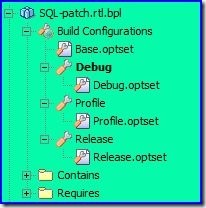
  5. Build Configuration:
    1. New Build configuration implement new Option Set introduced in Delphi 2009.
    2. For our development environment, we define build configuration as below:
      1. Base (..\build\optset\Base.optset)
        1. Debug (..\build\optset\Debug.optset)
        2. Profile (..\build\optset\Profile.optset)
        3. Release (..\build\optset\Release.optset)

          Capture_thumb51
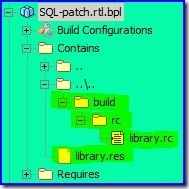
  6. RC Files
    1. Remove library.rc file from Project Manager
    2. Add "..\build\rc\library.rc" into Project
    3. Remove "{$R 'rc\library.res' 'rc\library.rc'}" on first line of *.dpk files
    4. Add "{$R 'library.res'}" below "{$R *.res}"

      Capture_thumb6
    5. Build and Compile
    6. You should see "library.res" appears in Contains node of Project Manager when you re-open the project again next time.

      Capture_thumb7

Saturday, September 27, 2008

Linux: Upload files in background

We may use curl to upload files to a FTP server in background without user intervention.  curl supports resume and retry features as well.

Upload a file to ftp server (-T / --upload-file <file>)

curl -T <file> ftp://server/path/

Upload a file to ftp server that require authentication (-u /-user <user:password>)

curl -u <user>:<password> -T <file> ftp://server/path/

Upload with Retry (--retry <num>) for non stable network connection

curl --retry 50 -u <user>:<password> -T <file> "ftp://server/path/"

Upload with Resuming

curl -C - -u <user>:<password> -T <file> "ftp://server/path/"

Friday, September 26, 2008

Delphi 2009: Using DBX4 Framework

Delphi 2009 DBX4 has some behavioral changes compare to Delphi 2007 DBX4.  I blog all my study and research against DBX4 here so that I may continue working next time when there are new DBX updates in later official updates from CodeGear.

My first experience on Delphi 2009 DBX4 is not good and full of glitches while I working on it.  After spending few days study the DBX4 source (documentation doesn't help much here).  I finally come out with my own solution for Delphi 2009 DBX4 in order to make my Delphi 2007 application able to migrate over.

Case 1: dbxdrivers.ini and dbxconnections.ini

Note: This problem has resolved in Delphi build 12.0.3250.18309.

Deploy DBX4 application on a new machine will always fail at runtime if dbxdrivers.ini and dbxconnections.ini do not exist in folder "%public%\Documents\RAD Studio\dbExpress".

I have post this issue to CodeGear discussion forum and receive pretty good response here: https://forums.codegear.com/message.jspa?messageID=20783#20783

Bob Swart who help me confirm the problem has file a QC report: http://qc.codegear.com/wc/qcmain.aspx?d=67210 

Case 1: Solution

The cause of this problem to related to the design of static method TDBXConnectionFactory.GetConnectionFactory in unit DBXCommon.pas. This method is design using singleton pattern that return a TDBXConnectionFactory instance.  However, the default instance returned is instantiated from class TDBXIniFileConnectionFactory.  This class always return loaded drivers and connections from the 2 *.ini files.

TDBXMemoryConnectionFactory is only used by TSQLConnection.DoConnect in a try...except...end block.  I think it's purpose is to create TDBXIniFileConnectionFactory factory first, and if fail due to missing two *.ini files or whatever reason, it will use a TDBXMemoryConnectionFactory instance.  However, there are many other DBX operations invoke TDBXMemoryConnectionFactory.GetConnectionFactory too (e.g.: TSQLConnection.SetDriverName).  This is not a good design to cover all the holes by try...except...end as in TSQLConnection.DoConnect.

To provide a workaround solution for this problem, I create a TDBXMemoryConnectionFactory instance explicitly and inject it into TDBXConnectionFactory before TDBXConnectionFactory.GetConnectionFactory was invoked.  Since it behave as singleton, it won't instantiate the default TDBXIniFileConnectionFactory class any more for it's life time process:

var C: TDBXConnectionFactory;
begin
  C := TDBXMemoryConnectionFactory.Create;
  C.Open;
  TDBXConnectionFactory.SetConnectionFactory(C);
end;

Case 2: TSQLConnection.DriverName must have value

In my DBX application, I create a TSQLConnection instance on the fly as my application may work with many type of database server (e.g.: Firebird, MSSQL or MySQL).  I couldn't decide the DriverName at design time.  It is up to the end user to state which database server to connect.

As GetDriverFunc, LibraryName and VendorLib property in TSQLConnection seems to provide enough parameters for a database connection, I tend to left TSQLConnection.DriverName empty as it serve no purpose for the connection except filling the 3 properties value mention retrieve from TDBXConnectionFactory.FDrivers collection.

However, an empty DriverName will fail in procedure TSQLConnection.CheckLoginParams invoked by TSQLConnection.DoConnect:

procedure TSQLConnection.CheckLoginParams;
var
  I: Integer;
  DriverProps: TDBXProperties;
begin
  ...
  if FDriverName = '' then DataBaseError(SMissingDriverName);
  ...
end;

I personally feel this is an unnecessary checking if I don't rely on two *.ini files to initiate a connection.  In order to avoid spending time doing source code patch for this issue, I rather specify a non-empty DriverName value for TSQLConnection:

begin
  ...
  sqlconnection1.DriverName := 'Firebird';
  ...
end;

Another issue float on now.  As I use a workaround solution mentioned in Case 1 to avoid deploying 2 *.ini files, I have no driver instance store in TDBXConnectionFactory.FDrivers collection.  When I try to set a value for DriverName, a "TDBXErrorCodes.DriverInitFailed" exception will occurs in SQLConnection.SetDriverName method.

Case 2: Solution

I should register a Firebird dynalink driver to DBX4 framework in order to make DriverName setting work.  The code is copy from DBXInterbase.pas and some changes has made allow it work as expected:

unit DBXFirebird;

...

const
  sDriverName = 'Firebird';

...
initialization
  TDBXDriverRegistry.RegisterDriverClass(sDriverName, TDBXFirebirdDriver);
finalization
  TDBXDriverRegistry.UnregisterDriverClass(sDriverName);
end.

You should able to to connect to firebird database with DBX4 now.

Case 3: Custom value for GetDriverFunc, LibraryName and VendorLib in property TSQLConnection is not functioning

No matter what value you set for GetDriverFunc, LibraryName and VendorLib, TSQLConnection will not respect these values.  It will only follow the initial values specify in dynalink driver (DBXInterbase.pas).

After tracing the dynalink driver source, I found out the problem occurs in the following method:

constructor TDBXInterBaseDriver.Create(DBXDriverDef: TDBXDriverDef);
begin
  inherited Create(DBXDriverDef, TDBXDynalinkDriverLoader);
  rpr;
  InitDriverProperties(TDBXInterBaseProperties.Create(DBXDriverDef.FDBXContext));
end;

Invoke InitDriverProperties will set a default properties instance into TDBXInterbaseDriver.  When the following method is invoke:

procedure TDBXDynalinkDriver.LoadDriver(DBXContext: TDBXContext);
var
  Loader: TDBXDynalinkDriverCommonLoader;
begin
  if not Assigned(FMethodTable) then
  begin
  ...
      Loader.LoadDriverLibraryAndMethodTable(DBXContext, GetDriverProperties);
  ...
  end;
end;

The Loader.LoadDriverLibraryAndMethodTable will always get the default TDBXProperties instance from InitDriverProperties.

I have reported this problem to QC: http://qc.codegear.com/wc/qcmain.aspx?d=67139

Case 3: Solution

After study the source, I found out the problem happens in the following method:

function TDBXDynalinkDriverNative.CreateConnection(ConnectionBuilder: TDBXConnectionBuilder): TDBXConnection;
var
  ConnectionHandle: TDBXConnectionHandle;
  ErrorResult:  TDBXErrorCode;
begin
  LoadDriver(ConnectionBuilder.DbxContext);
  ErrorResult := FMethodTable.FDBXDriver_CreateConnection(FDriverHandle, ConnectionHandle);
  CheckResult(ErrorResult);
  Result := TDBXDynalinkConnection.Create(ConnectionBuilder, ConnectionHandle, FMethodTable);
end;

The ConnectionBuilder.ConnectionProperties contain the all the custom setting from TSQLConnection.  Unfortunately, it never be used in CreateConnection.  Instead, it use the initial properties stored in TDBXDriver.FDriverProperties.

My solution is override the CreateConnection method to make it consume the custom value in ConnectionBuilder.ConnectionProperties:

function TDBXFirebirdDriver.CreateConnection(ConnectionBuilder:
    TDBXConnectionBuilder): TDBXConnection;
var
  ConnectionHandle: TDBXConnectionHandle;
  ErrorResult:  TDBXErrorCode;
begin
  LoadDriverWithConnectionBuilder(ConnectionBuilder);
  ErrorResult := FMethodTable.FDBXDriver_CreateConnection(FDriverHandle, ConnectionHandle);
  CheckResult(ErrorResult);
  Result := TDBXDynalinkConnection.Create(ConnectionBuilder, ConnectionHandle, FMethodTable);
end;

procedure TDBXFirebirdDriver.LoadDriverWithConnectionBuilder(ConnectionBuilder:
    TDBXConnectionBuilder);
var
  Loader: TDBXDynalinkDriverLoader_Enhance;
begin
  if not Assigned(FMethodTable) then
  begin
    Loader := FDriverLoaderClass.Create as TDBXDynalinkDriverLoader_Enhance;
    try
      Loader.LoadDriverLibraryAndMethodTable(ConnectionBuilder.DbxContext, ConnectionBuilder.ConnectionProperties);
      FMethodTable := Loader.FMethodTable;
      Loader.FMethodTable := nil;
      FDriverHandle := Loader.FDriverHandle;
      Loader.FreeOldLibrary;
    finally
      FreeAndNil(Loader.FMethodTable);
      Loader.Free;
    end;
  end;
end;

The loader class TDBXDynalinkDriverLoader_Enhance is duplicated and inherited from TDBXDynalinkDriverLoader as I can't access 2 private methods: FreeOldLibrary and LoadDriverLibraryAndMethodTable:

TDBXDynalinkDriverLoader_Enhance = class(TDBXDynalinkDriverLoader)
private
  procedure FreeOldLibrary;
  procedure LoadDriverLibraryAndMethodTable(DBXContext: TDBXContext; Properties:
      TDBXProperties);
end;

Case 4: AutoUnloadDriver doesn't work as is

AutoUnloadDriver is a new connection parameter property for Delphi 2009.  As stated in DBXCommon.pas for AutoUnloadDriver:

If set to true, dynalink drivers will automatically unload their dll, when there are no longer any open connections that use the driver.

I love this feature as it will release the related DLL if no connection is active.

However, none of the Delphi DBX driver provide this as default setting and there is no way to make AutoUnloadDriver activate.

I have report this problem: QC#67233.

Case 4: Solution

The Dynalink Driver class has the following constructor:

constructor TDBXDynalinkDriver.Create(DBXDriverDef: TDBXDriverDef; DBXDriverLoader: TDBXDynalinkDriverCommonLoaderClass);
begin
  inherited Create(DBXDriverDef);
  FDriverLoaderClass := DBXDriverLoader;
  // '' makes this the default command factory.
  //
  AddCommandFactory('', CreateDynalinkCommand);
  if (DriverProperties = nil) or not DriverProperties.GetBoolean(TDBXPropertyNames.AutoUnloadDriver) then
    CacheUntilFinalization;
end;

To make AutoUnloadDriver work as it should, the clue is to avoid invoke CacheUntilFinalization in the constructor.  In order to do that, we must make sure DriverProperties is not nil and AutoUnloadDriver property has value "True":

constructor TDBXFirebirdDriver.Create(DBXDriverDef: TDBXDriverDef);
var P: TDBXProperties;
begin
  P := TDBXProperties.Create(DBXDriverDef.FDBXContext);
  P.Values[TDBXpropertyNames.AutoUnloadDriver] := 'True';
  InitDriverProperties(P);
  inherited Create(DBXDriverDef, TDBXDynalinkDriverLoader_Enhance);
end;

Monday, September 22, 2008

Install ModelMaker Code Explorer on non-privilege account

If you run Delphi IDE on administrator account account, you probably won't encounter any problem launching ModelMaker Code Explorer (MMX).

We mostly work on non-privilege (limited user) account for our daily task since Windows Vista.  Installing MMX on administrator account and run Delphi IDE on limited user account will not load the MMX expert.

We have to manually install the MMX for limited user account:

  1. In Limited user account, run RegEdit.exe
  2. Navigate to:
    1. "HKEY_CURRENT_USER\Software\Borland\BDS\5.0\Experts" for Delphi 2007
    2. "HKEY_CURRENT_USER\Software\CodeGear\BDS\6.0\Experts" for Delphi 2009
  3. Add a string values "MideXExpert" (omit quotes):
    1. "C:\Program Files\ModelMakerTools\Midex\7.00\mmx_bds5.dll" for Delphi 2007
    2. "C:\Program Files\ModelMakerTools\Midex\7.00\mmx_bds6.dll" for Delphi 2009

Migrate MMX 5.0 setting to MMX 7.0

You may follow the steps to migrate old MMX setting to new version:

  1. Run RegEdit.exe in your user account
  2. Navigate to "HKEY_CURRENT_USER\Software\ModelMaker\MideX\5.0" and export the setting to a registry file (*.reg).
  3. Open the exported registry file with Notepad
  4. Replace all string of "\5.0" to "\7.0" and save the file
  5. Double click the registry file to merge the setting to registry
  6. Your MMX 5.0 setting is now migrated to MMX 7.0.

Wednesday, September 17, 2008

Using GNU Privacy Guard (GPG)

GPG exist in both Windows and Linux system. It is a tool to perform public key encryption for files or messages. GPG may download from http://www.gnupg.org/

Some useful commands

  1. Creating keys: gpg --gen-key
  2. Exporting public keys: gpg --export -a [UID]
  3. Exporting private keys: gpg --export-secret-key -a [UID]
  4. Importing keys: gpg --import [FileName]
  5. List keys: gpg --list-keys
  6. Delete public keys: gpg --delete-keys UID
  7. Delete private keys: gpg --delete-secret-keys UID
  8. Encrypt a file: gpg -e -r [UID] <filename>
  9. Decrypt a file: gpg -d -o <output-file> <myfile.gpg>

Wednesday, August 20, 2008

Delphi 2007: Out of Sync problem in .DPROJ

Background

Delphi project file consist of only one file (.dpk) before Delphi 2006.  Beginning of Delphi 2006, MSBUILD (similar to ANT) is used as project build tool.  Since then, Delphi 2006 project file consist of 2 files: .DPROJ and .DPK.  The out of sync issue between .DPK and .DPROJ cause a lot of problems when working in version control environment.

Motivation

The .DPROJ is not perfect due to the XML wasn't tidy up nicely.  There are some problems with .dproj design:

  1. We always confuse when compare local and remote copy of .DPROJ if only none or minor changes has done.
  2. RC file wasn't handle well in .DPROJ
  3. The folders and compilation parameters stored in .DPROJ will change each time a .DPROJ file was saved even no changes has made.
  4. If the changes made on .DPK file, it is hardly get reflected in .DPROJ file and thus cause confusion when comparing.

Consequences

A .DPROJ that has problems may cause:

  1. Compilation errors
  2. .RC file will not compile if it is missing in .DPROJ file
  3. Delphi IDE Project Manager show unwanted entries
  4. .pas unit that has removed but still show in .DPROJ

Solution

You may always follow the steps to re-tidy a .DPROJ that you think it has problems:

  1. Close project in Delphi IDE editor that open the .DPROJ file
  2. Use any text editor (Notepad or Notepad++) to the .DPROJ file:

    <Project xmlns="http://schemas.microsoft.com/developer/msbuild/2003">
      ...
      <ItemGroup>
        <DelphiCompile Include="SQL.Office.GUI.dpk">
          <MainSource>MainSource</MainSource>
        </DelphiCompile>
        <DCCReference Include="..\..\core\source\FormClass.Catalog.pas" />
        <DCCReference Include="..\..\core\source\FormClass.Export.pas" />
        <DCCReference Include="..\source\Common.GUI.Reg.pas" />
        <DCCReference Include="..\source\Profile.EF.pas">
          <Form>Profile_EF</Form>
        </DCCReference>
        <DCCReference Include="cxEditorsD11.dcp" />
        <DCCReference Include="cxExtEditorsD11.dcp" />
        <DCCReference Include="cxLibraryD11.dcp" />
        <DCCReference Include="cxPageControlD11.dcp" />
        <DCCReference Include="oobase.dcp" />
        <DCCReference Include="vcl.dcp" />
      </ItemGroup>
    </Project>

  3. The above .DPROJ file has some missing entries
  4. Remove all DCCReference item:

    <Project xmlns="http://schemas.microsoft.com/developer/msbuild/2003">
      ...
      <ItemGroup>
        <DelphiCompile Include="SQL.Office.GUI.dpk">
          <MainSource>MainSource</MainSource>
        </DelphiCompile>
        <DCCReference Include="..\..\core\source\FormClass.Catalog.pas" />
        <DCCReference Include="..\..\core\source\FormClass.Export.pas" />
        <DCCReference Include="..\source\Common.GUI.Reg.pas" />
        <DCCReference Include="..\source\Profile.EF.pas">
          <Form>Profile_EF</Form>
        </DCCReference>
        <DCCReference Include="cxEditorsD11.dcp" />
        <DCCReference Include="cxExtEditorsD11.dcp" />
        <DCCReference Include="cxLibraryD11.dcp" />
        <DCCReference Include="cxPageControlD11.dcp" />
        <DCCReference Include="oobase.dcp" />
        <DCCReference Include="vcl.dcp" />
      </ItemGroup>
    </Project>

  5. Open the .DPROJ project in Delphi IDE
  6. Open the corresponding .DPK file in Delphi IDE editor (Project | View Source)
  7. Make the .DPK file become modified (e.g.: add a space character and remove the space character)
  8. Save the project
  9. If you use compare your local .DPROJ copy with CVS copy, you will see all missing or weird entries has recovered:

    <Project xmlns="http://schemas.microsoft.com/developer/msbuild/2003">
      ...
      <ItemGroup>
        <DelphiCompile Include="SQL.Office.GUI.dpk">
          <MainSource>MainSource</MainSource>
        </DelphiCompile>
        <DCCReference Include="..\..\..\venus\account\source\stock.1\project\cxEditorsD11.dcp" />
        <DCCReference Include="..\..\..\venus\account\source\stock.1\project\cxExtEditorsD11.dcp" />
        <DCCReference Include="..\..\..\venus\account\source\stock.1\project\cxLibraryD11.dcp" />
        <DCCReference Include="..\..\..\venus\account\source\stock.1\project\cxPageControlD11.dcp" />
        <DCCReference Include="..\..\..\venus\account\source\stock.1\project\oobase.dcp" />
        <DCCReference Include="..\..\..\venus\account\source\stock.1\project\oobasevcl.dcp" />
        <DCCReference Include="..\..\..\venus\account\source\stock.1\project\oodb.dcp" />
        <DCCReference Include="..\..\..\venus\account\source\stock.1\project\vcl.dcp" />
        <DCCReference Include="..\..\core\source\FormID.Catalog.pas" />
        <DCCReference Include="..\..\core\source\FormID.Export.pas" />
        <DCCReference Include="..\source\Common.GUI.Reg.pas" />
        <DCCReference Include="..\source\Profile.EF.pas">
          <Form>Profile_EF</Form>
        </DCCReference>
      </ItemGroup>
    </Project>

  10. If the project contain any .RC entry, you may now drag the .RC files into the Project Manager and save it
  11. Now the content of .DPROJ should be fine for check in:

    <Project xmlns="http://schemas.microsoft.com/developer/msbuild/2003">
      ...
      <ItemGroup>
        <DelphiCompile Include="SQL.Office.GUI.dpk">
          <MainSource>MainSource</MainSource>
        </DelphiCompile>
        <DCCReference Include="..\..\..\venus\account\source\stock.1\project\cxEditorsD11.dcp" />
        <DCCReference Include="..\..\..\venus\account\source\stock.1\project\cxExtEditorsD11.dcp" />
        <DCCReference Include="..\..\..\venus\account\source\stock.1\project\cxLibraryD11.dcp" />
        <DCCReference Include="..\..\..\venus\account\source\stock.1\project\cxPageControlD11.dcp" />
        <DCCReference Include="..\..\..\venus\account\source\stock.1\project\oobase.dcp" />
        <DCCReference Include="..\..\..\venus\account\source\stock.1\project\oobasevcl.dcp" />
        <DCCReference Include="..\..\..\venus\account\source\stock.1\project\oodb.dcp" />
        <DCCReference Include="..\..\..\venus\account\source\stock.1\project\vcl.dcp" />
        <DCCReference Include="..\..\core\source\FormID.Catalog.pas" />
        <DCCReference Include="..\..\core\source\FormID.Export.pas" />
        <DCCReference Include="..\source\Common.GUI.Reg.pas" />
        <DCCReference Include="..\source\Profile.EF.pas">
          <Form>Profile_EF</Form>
        </DCCReference>
        <RcCompile Include="rc\library.rc">
          <Form>library.res</Form>
        </RcCompile>
      </ItemGroup>
    </Project>
  12. You may now check in .DPROJ file into Version Control service.
  13. You may encounter a situation that no changes has made to the project but remote copy shows lot of changes.  In most situation, it is only the changes to folders in .DCP entries.  You may ignore this changes and revert your local copy of the .DPROJ file from Version Control service.
    <Project xmlns="http://schemas.microsoft.com/developer/msbuild/2003">
      ...
      <ItemGroup>
        <DelphiCompile Include="SQL.Office.GUI.dpk">
          <MainSource>MainSource</MainSource>
        </DelphiCompile>
        <DCCReference Include="$(SystemRoot)\system32\cxEditorsD11.dcp" />
        <DCCReference Include="$(SystemRoot)\system32\cxExtEditorsD11.dcp" />
        <DCCReference Include="$(SystemRoot)\system32\cxLibraryD11.dcp" />
        <DCCReference Include="$(SystemRoot)\system32\cxPageControlD11.dcp" />
        <DCCReference Include="$(SystemRoot)\system32\oobase.dcp" />
        <DCCReference Include="$(SystemRoot)\system32\oobasevcl.dcp" />
        <DCCReference Include="$(SystemRoot)\system32\oodb.dcp" />
        <DCCReference Include="$(SystemRoot)\system32\vcl.dcp" />
        <DCCReference Include="..\..\core\source\FormID.Catalog.pas" />
        <DCCReference Include="..\..\core\source\FormID.Export.pas" />
        <DCCReference Include="..\source\Common.GUI.Reg.pas" />
        <DCCReference Include="..\source\Profile.EF.pas">
          <Form>Profile_EF</Form>
        </DCCReference>
        <RcCompile Include="rc\library.rc">
          <Form>library.res</Form>
        </RcCompile>
      </ItemGroup>
    </Project>

Monday, May 26, 2008

Install Windows Vista from USB Flash Drive

Most machine nowadays has built-in USB 2.0 hi speed port and able to boot from USB flash drive . But not all machine has CD/DVD-ROM. The following method prepares a USB flash drive for Windows Vista installation: Requirements:
  1. A USB flash drive supports USB 2.0 with size of 4G (able to hold a Windows Vista ISO)
  2. A machine support USB 2.0 and bootable from USB flash drive
Steps to prepares a USB flash drive from Windows Vista machine:
  1. Insert USB Flash drive
  2. Run CMD from administrator account (or run as administrator)
  3. The following commands are run within diskpart:
    1. list disk (to list all disk in system including USB flash drive, identify your USB flash drive disk number here)
    2. select disk 1 (assume USB flash drive is disk number 1)
    3. clean (clean all partition in USB flash drive)
    4. create partition primary (create a primary partition in USB flash drive)
    5. select partition 1 (select the newly created partition)
    6. active (mark the partition active)
    7. format fs=fat32 (format the partition with FAT32 file system)
    8. assign (assign a drive letter to the partition, assume is drive E:)
    9. exit (quit diskpart utility)
  4. Insert Windows Vista DVD-ROM or mount the Windows Vista ISO file to drive D:
  5. Copy all file and folders from Windows Vista DVD-ROM to USB Flash drive:
    1. xcopy d:\*.* /s/e/f e:\
  6. Safely remove the USB flash drive from your machine
  7. Plug the USB flash drive to new machine for Windows Vista Installation
  8. Make sure you try to reboot the machine with USB Booting
  9. Enjoy and start Windows Vista installation from USB flash drive without DVD-ROM
Reference:
  1. HOWTO: Install Windows Vista from a high speed USB 2.0 Flash Drive

Wednesday, May 07, 2008

Some useful RPM command

Redhat or Fedora using RPM to manage package installation. RPM will report package dependencies if the installation failed. However, I found YUM is much more easy than RPM in install and uninstall operation. However, there are some useful aspect of using RPM.
# To list all installed packages
rpm -qa

# To query a package information and dependencies packages
rpm -qilR 

# To query which package require a package
rpm -q --whatrequires 

# To query which package provide the file
rpm -q --whatprovides 

# Test package installation
rpm -ivv --test 

Configure a masqueraded router

A router need at least 2 network interfaces. The following example using 2 network interfaces, eth0 and eth1 as example. eth0 is external network interface. All packets passed thru' this interface will be masqueraded before sending out. In real world situation, this interface is usually refer to internet gateway. eth1 is internal network interface. This is usually gateway for internal private network. There are 2 steps configure a masquerade router. Step 1: Enable IP packet forwarding
sysctl -w net.ipv4.ip_forward=1
Step 2: Enable IP packet masquerading Firewall (IPTABLES)
# Clearing any existing rules and setting default policy..

iptables -P INPUT ACCEPT
iptables -F INPUT
iptables -P OUTPUT ACCEPT
iptables -F OUTPUT
iptables -P FORWARD DROP
iptables -F FORWARD
iptables -t nat -F

# FWD: Allow all connections OUT and only existing and related ones IN

iptables -A FORWARD -i eth0 -o eth1 -m state --state ESTABLISHED,RELATED -j ACCEPT
iptables -A FORWARD -i eth1 -o eth0 -j ACCEPT

# Enabling SNAT (MASQUERADE) functionality on $EXTIF
iptables -t nat -A POSTROUTING -o eth0 -j MASQUERADE
The masquerading router should have up once the above script is executed. You may try to ping both eth0 and eth1 to confirm that. Also try to ping public network to make sure it works. You may persist the iptables rules using
service iptables save

Friday, April 11, 2008

Draw a translucent effect image

We may use windows GDI function AlphaBlend to draw translucent graphic. The following example extract a portion of desktop image and draw to TImage.canvas with translucent effect. The resulting graphic will looks like there is a green color transparent sheet cover on the image.
var hDesktop: HWND;
 DC: HDC;
 T: BLENDFUNCTION;
begin
hDesktop := GetDesktopWindow;
DC := GetDC(hDesktop);
try
 T.BlendOp := AC_SRC_OVER;
 T.BlendFlags := 0;
 T.SourceConstantAlpha := $80;
 T.AlphaFormat := 0;

 Image1.Canvas.Brush.Color := clGreen;
 Image1.Canvas.FillRect(Rect(0, 0, Image1.Width, Image1.Height));
 Windows.AlphaBlend(Image1.Canvas.Handle, 0, 0, Image1.Width, Image1.Height, DC, 0, 0, Image1.Width, Image1.Height, T);
finally
 ReleaseDC(hDesktop, DC);
end;
end;

Wednesday, March 19, 2008

Compile DPK files using DCC32

Using Delphi command lines compiler DCC32 to compile programs allow us to set some switches to get various kind of output. The most common usage is compile a debugged or non-debugged release. For example, we may use dcc32 -B -$O-,D+,L+,YD to compile dcu/dcp with debug information and dcc32 -B -$O-,D-,L-,Y- to compile dcu/dcp without debug information. However, you may notice that using such switches has no effect on DPK (Delphi package) files. The reason is simple but yet difficult to discover. If you study DPK files, you may see the following:
package MyPackage;

{$R *.res}
{$ALIGN 8}
{$ASSERTIONS ON}
{$BOOLEVAL OFF}
{$DEBUGINFO ON}
{$EXTENDEDSYNTAX ON}
{$IMPORTEDDATA ON}
{$IOCHECKS ON}
{$LOCALSYMBOLS ON}
{$LONGSTRINGS ON}
{$OPENSTRINGS ON}
{$OPTIMIZATION OFF}
{$OVERFLOWCHECKS OFF}
{$RANGECHECKS OFF}
{$REFERENCEINFO ON}
{$SAFEDIVIDE OFF}
{$STACKFRAMES OFF}
{$TYPEDADDRESS OFF}
{$VARSTRINGCHECKS ON}
{$WRITEABLECONST OFF}
{$MINENUMSIZE 1}
{$IMAGEBASE $400000}
{$DESCRIPTION 'E Stream Software - Runtime Library'}
{$LIBPREFIX 'SQL.'}
{$RUNONLY}
{$IMPLICITBUILD OFF}
{$DEFINE DEBUG}
The DPK files already has built in compiler directives. It has priority over the switches you specified in command lines. As stated by Allen Bauer in the post:
The IDE supports a very little know feature where you can continue to control these options while in the IDE, yet allow the command-line be able to also control the options. In a package file, all the options listed there are propagated to all the contained units. This is different than a normal .dpr program/library file. In order to do this, all you need to do is replace the '$' with a ' ' (that's a ). Then when you open the dpk in the IDE, you can toggle those options as much as you like, but when you compile on the command-line, you can still control them. This is how we build all our packages for the product itself. All of the Borland built packages have DEBUGINFO, STACKFRAMES, ASSERTIONS, OPTIMIZATION, LOCALSYMBOLS setup this way because like you, we wan't to be able to control those options from the command-line. The developers will typically do a complete "debug" build, whereas the integration team will not. $DEFINES will sort of work the same way, in that if you replace the '$' with a ' ', the IDE will still recognize the defines and apply them, but any other modifications to the dpk source will re-insert the '$' character.
The solution is replace $ with a space character (' ') for all compiler directives only:
package MyPackage;

{$R *.res}
{$ALIGN 8}
{ ASSERTIONS ON}
{ BOOLEVAL OFF}
{ DEBUGINFO ON}
{ EXTENDEDSYNTAX ON}
{ IMPORTEDDATA ON}
{ IOCHECKS ON}
{ LOCALSYMBOLS ON}
{ LONGSTRINGS ON}
{ OPENSTRINGS ON}
{ OPTIMIZATION OFF}
{ OVERFLOWCHECKS OFF}
{ RANGECHECKS OFF}
{ REFERENCEINFO ON}
{ SAFEDIVIDE OFF}
{ STACKFRAMES OFF}
{ TYPEDADDRESS OFF}
{ VARSTRINGCHECKS ON}
{ WRITEABLECONST OFF}
{ MINENUMSIZE 1}
{$IMAGEBASE $400000}
{$DESCRIPTION 'E Stream Software - Runtime Library'}
{$LIBPREFIX 'SQL.'}
{$RUNONLY}
{$IMPLICITBUILD OFF}
{$DEFINE DEBUG}
By doing so, both the IDE and DCC32 will respect the switches and yield expected results and. The output files (DLL, BPL or EXE) do not contain any debugging information even if you turn on the debugging switches. Those debugging information are stored in DCU or DCP files. To keep the debug information in DLL, BPL or EXE, turn on the Include TD32 debug info or use -V switch with DCC32.

Saturday, March 08, 2008

Retrieve Shell Folders

Windows has some special folders like My Documents, SendTo, Desktop or Favorites. The location of this folders are keep in the following registry key: HKEY_CURRENT_USER\Software\Microsoft\Windows\CurrentVersion\Explorer\Shell Folders However, it is not encourage to retrieve the location of special folders using registry. The recommended way to retrieve is via windows API function SHGetFolderPath:
uses SHFolder;

var sDir: string;
begin
  SetLength(sDir, MAX_PATH);
  ZeroMemory(@sDir[1], MAX_PATH);
  if Succeeded(SHGetFolderPath(0, CSIDL_PERSONAL, 0, 0, PAnsiChar(sDir))) then
    ShowMessage(sDir);
end;

Tuesday, March 04, 2008

Beware of XML Content contain CRLF always cause problem with Google API

We may consume the Google API to post entry of event kind. Those entry are mostly encoded in XML content. It is a common habit for windows user to create the XML content in windows notepad. If we pass the XML content from notepad directly to the Google API, we will mostly encounter error such as HTTP 400 Bad Request. The reason is simple but yet difficult to discover. CRLF (0x0D 0x0A) is default line separator in windows operating system. The Google API or perhaps the content type we specify in the HTTP request header is application/atom+xml may not recognize the CRLF and cause the HTTP 400 Bad request error. Always remember to well form the XML content before consume the API services. For example, replace all CRLF to a space character:
NewXMLText := StringReplace(XMLText, #13#10, ' ', [rfReplaceAll, rfIgnoreCase]);

Using Indy HTTPS client to consume Google API service

Indy VCL 10 distribution supports SSL via OpenSSL but it didn't bundle the DLL library. We have to download the Win32 OpenDDL from here. After install the Win32 OpenSSL library, there are 2 .DLL files we are interested may be found in %windir%\system32: libssl32.dll and libeay32.dll. However, the Indy Open SSL unit IdSSLOpenSSLHeaders.pas are coding as: SSL_DLL_name = 'ssleay32.dll'; {Do not localize} SSLCLIB_DLL_name = 'libeay32.dll'; {Do not localize} To make the Indy works with OpenSSL, we have to rename one of the DLL file libssl32.dll to ssleay32.dll. Here is a sample code using Indy VCL to authenticate with Google Calendar service:
var S: TStringList;
   M: TStream;
begin
 S := TStringList.Create;
 M := TMemoryStream.Create;
 try
   S.Values['Email'] := 'your google account';
   S.Values['Passwd'] := 'your password';
   S.Values['source'] := 'estream-sqloffice-1.1.1.1';
   S.Values['service'] := 'cl';

   IdHTTP1.IOHandler := IdSSLIOHandlerSocketOpenSSL1;
   IdHTTP1.Request.ContentType := 'application/x-www-form-urlencoded';
   IdHTTP1.Post('https://www.google.com/accounts/ClientLogin', S, M);
   Memo1.Lines.Add(Format('Response Code: %d', [IdHTTP1.ResponseCode]));
   Memo1.Lines.Add(Format('Response Text: %s', [IdHTTP1.ResponseText]));

   M.Position := 0;
   S.LoadFromStream(M);
   Memo1.Lines.AddStrings(S);
 finally
   S.Free;
   M.Free;
 end;
end;

Sunday, February 24, 2008

Resize Form even if it is borderless

We may make a form without borders to show some additional information using some popup windows. However, a borderless form will no longer resizable. Use the following code to make a borderless form resizable:
type
 TForm1 = class(TForm)
 protected
   procedure CreateParams(var Params: TCreateParams); override;
 end;

procedure TForm1.CreateParams(var Params: TCreateParams);
begin
 BorderStyle := bsNone;
 inherited;
 Params.ExStyle := Params.ExStyle or WS_EX_STATICEDGE;
 Params.Style := Params.Style or WS_SIZEBOX;
end;

Move a form without dragging on the title bar

We usually use mouse to drag the windows form title bar to move the window on our desktop. There is a new way to move the form by just dragging on any point in the form itself. This is ideally suitable for those form that don't have title bar. For example, FormStyle := bsNone; Use the following code to drag on window content and you able to move the form just as you drag on title bar:
type
  TForm1 = class(TForm)
  private
    procedure WMNCHitTest(var Msg: TWMNCHitTest); message WM_NCHitTest;
  end;

procedure TForm1.WMNCHitTest(var Msg: TWMNCHitTest);
begin
  inherited;
  if Msg.Result = htClient then
    Msg.Result := htCaption;
end;
The above code attempt to hijack the mouse event to tell the system to treat the mouse click action on windows client area as mouse click on windows title bar. There is a drawback using the message handler. All form's customize mouse events will no longer function as the mouse event has been hijacked by WM_NCHitTest handler. What if there are controls on the forma and you still wish to drag on the window to move the form around? The above above will only function if you drag on the empty area in the form. To make the dragging more sensible, write a MouseMove event for the control:
procedure TForm12.ListBox1MouseMove(Sender: TObject; Shift: TShiftState; X, Y:
  Integer);
begin
  ReleaseCapture;
  SendMessage(Self.Handle, WM_SYSCOMMAND, 61458, 0);
end;

Thursday, February 21, 2008

TListBox review

TListBox is a simple visual component that always use for display a list of items but it has some nice features that we always neglected. Using TListBox to show column-like data
procedure TForm1.FormCreate(Sender: TObject);
var L: TListBox;
begin
 L := TListBox.Create(Self);
 L.Parent := Self;
 L.Align := alClient;
 L.TabWidth := 20;
 with L.Items do begin
   Add('Item 01'^I'This is Item 01'^I'3.00');
   Add('Item 02'^I'This is Item 02'^I'5.00');
   Add('Item 03'^I'This is Item 03'^I'23.00');
   Add('Item 04'^I'This is Item 04'^I'33.00');
   Add('Item 05'^I'This is Item 05'^I'43.00');
 end;
end;
Custom Draw items in TListBox #1
procedure TForm1.FormCreate(Sender: TObject);
var L: TListBox;
begin
 L := TListBox.Create(Self);
 L.Parent := Self;
 L.Align := alClient;
 L.Style := lbOwnerDrawFixed;
 L.OnDrawItem := OnDrawItem;
 with L.Items do begin
   Add('Item 01');
   Add('Item 02');
   Add('Item 03');
   Add('Item 04');
   Add('Item 05');
 end;
end;

procedure TForm1.OnDrawItem(Control: TWinControl; Index: Integer;
 Rect: TRect; State: TOwnerDrawState);
var C: TColor;
begin
 with Control as TListBox do begin
   Canvas.FillRect(Rect);

   if odSelected in State then
     C := Canvas.Font.Color
   else if Index mod 2 = 0 then
     C := clGreen
   else
     C := clBlue;
   Canvas.Font.Color := C;

   Canvas.TextOut(Rect.Left, Rect.Top, Items[Index]);
 end;
end;
Custom Draw items in TListBox #2
procedure TForm1.FormCreate(Sender: TObject);
var L: TListBox;
begin
 L := TListBox.Create(Self);
 L.Parent := Self;
 L.Align := alClient;
 L.Style := lbOwnerDrawVariable;
 L.OnDrawItem := OnDrawItem;
 L.OnMeasureItem := OnMeasureItem;
 with L.Items do begin
   Add('Item 01');
   Add('Item 02');
   Add('Item 03');
   Add('Item 04');
   Add('Item 05');
 end;
end;

procedure TForm11.OnDrawItem(Control: TWinControl; Index: Integer;
 Rect: TRect; State: TOwnerDrawState);
var iSize: integer;
begin
 with Control as TListBox do begin
   Canvas.FillRect(Rect);

   if Index mod 2 = 0 then
     iSize := 12
   else
     iSize := 20;
   Canvas.Font.Size := iSize;

   Canvas.TextOut(Rect.Left, Rect.Top, Items[Index]);
 end;
end;

procedure TForm11.OnMeasureItem(Control: TWinControl; Index: Integer; var
 Height: Integer);
var iSize: integer;
   L: TListBox;
begin
 L := Control as TListBox;
 if Index mod 2 = 0 then
   iSize := 12
 else
   iSize := 20;
 L.Canvas.Font.Size := iSize;
 Height := L.Canvas.TextHeight(L.Items[Index]);
end;


Custom Draw items in TListBox #3 Due to the design of windows list box control, the OnMeasure event is trigger once only if an item is added. The following code shows example of how to draw item with custom item height.
procedure TForm1.BeforeDestruction;
begin
 inherited;
 Font1.Free;
 Font2.Free;
end;

procedure TForm1.FormCreate(Sender: TObject);
var L: TListBox;
begin
 L := TListBox.Create(Self);
 L.Parent := Self;
 L.Align := alClient;
 L.Style := lbOwnerDrawVariable;
 L.OnDrawItem := OnDrawItem;

 Font1 := TFont.Create;
 Font1.Name := 'Tahoma';
 Font1.Size := 25;
 Font1.Color := clGreen;

 Font2 := TFont.Create;
 Font2.Name := 'Arial';
 Font2.Size := 15;
 Font2.Color := clNavy;
 Font2.Style := [fsBold];

 with L.Items do begin
   AddObject('Item 01', Font1);
   AddObject('Item 02', Font2);
   AddObject('Item 03', Font1);
   AddObject('Item 04', Font2);
   AddObject('Item 05', Font1);
 end;
end;

procedure TForm1.OnDrawItem(Control: TWinControl; Index: Integer;
 Rect: TRect; State: TOwnerDrawState);
var C: TColor;
 L: TListBox;
begin
 L := Control as TListBox;
 L.Canvas.FillRect(Rect);

 C := L.Canvas.Font.Color;
 L.Canvas.Font.Assign(L.Items.Objects[Index] as TFont);
 if odSelected in State then
   L.Canvas.Font.Color := C;

 SendMessage(L.Handle, LB_SETITEMHEIGHT, Index, L.Canvas.TextHeight(L.Items[Index]));
 L.Canvas.TextOut(Rect.Left, Rect.Top, L.Items[Index]);
end;

Saturday, February 09, 2008

Create home directory manually

When we use /usr/sbin/useradd to create a user, it's home directory may contain some default files or folders (it is hidden usually). However, we may want to create a the home directory for user manually in certain situation, for example, use LDAP to manage user account: # mkdir /home/someuser # cp /etc/skel/.* /home/someuser # chown -R somebody.users /home/someuser # chmod 700 -R /home/someuser

Thursday, January 31, 2008

Color MDI Form

If we want to change background color of a form: we usually do like this:
 Form1.Color := clYellow;
However, if a Form's FormStyle is fsMDIForm, change the color at runtime will not update immediately not until the form has been fully repaint or resize. Invoke TForm.Refresh, TForm.Update, TForm.Repaint will not update the color as well. To make the a MDI form update the background color immediately, we may do this:
 Form1.Color := clYellow;
 Windows.InvalidateRect(Form1.ClientHandle, nil, True);

Thursday, January 24, 2008

How to avoid creation of ~BPL files in Delphi 2007

There is only one way to prevent creation of ~BPL in Delphi 2007 IDE: patch delphicoreide100.bpl in C:\Program Files\CodeGear\RAD Studio\5.0\bin. A good news is someone from http://www.liteapplications.com/ has wrote Delphi Distiller to patch the delphicoreide100.bpl. Hope CodeGear will provide an option in Delphi IDE to turn on and off the creation of ~BPL soon.

Thursday, January 17, 2008

Setup Visual Studio 2005 to build Firebird source

Due to I/O redirector problem in GBAK.EXE (http://tech.groups.yahoo.com/group/firebird-support/message/90995), I download Firebird source to attempt compile it under Visual Studio 2005. Here are the steps:
  1. Install Visual Studio 2005
  2. Read the instruction in firebird source folder: doc/README.build.msvc
  3. Install Firebird server
  4. Setup these environment variables:
    1. FIREBIRD=C:\Program Files\Firebird\Firebird_1_5
    2. ISC_USER=SYSDBA
    3. ISC_PASSWORD=masterkey
    4. LIB=C:\Program Files\Microsoft Visual Studio 8\VC\lib
    5. PATH=C:\Program Files\Microsoft Visual Studio 8\Common7\IDE;C:\Program Files\Microsoft Visual Studio 8\VC\bin
  5. Open file "builds\win32\blrtable.BAT", add an include path: -I"C:\Program Files\Microsoft Visual Studio 8\VC\include" to the cl.exe clause
  6. Open folder "builds\win32\msvc7", convert 2 solution files: Firebird2.sln and Firebird2Boot.sln to Visual Studio 2005 solution format.
  7. Execute cmd.exe, and run Prepare.BAT, make_boot.BAT and make_all.BAT

Wednesday, January 16, 2008

Embed out of process windows into Delphi Control

We may easily embed a Delphi GUI control into another container control like TForm or TPanel:
var F: TForm;
  B: TButton;
begin
F := TForm.Create(nil);
F.Show;
B := TButton.Create(nil);
B.Parent := F;
end;
As TForm or TPanel is a Window GUI control too, we may embed a non-delphi out of process windows into TForm or TPanel control too:
var F: TForm;
   H: THandle;
   T: Cardinal;
begin
 F := TForm.Create(nil);
 F.Show;

 ShellExecute(0, 'open', 'calc', nil, nil, 0);

 // New window may not be created yet, find the window in a loop until it show out
 H := 0;
 T := GetTickCount;
 while H = 0 do begin
   H := FindWindow(nil, PChar('Calculator'));
   if GetTickCount - T > 5000 then
     Break;
 end;

 if H <> 0 then
   Windows.SetParent(H, F.Handle);
end;

Saturday, December 22, 2007

Connect to Firebird 1.5 database on Windows Vista using Local Protocol

Using Local Protocol to connect to Firebird database no longer works in Windows Vista when we install firebird server using setup file's default configuration. Using local connection is convenient and fast if we perform GBAK, GFIX, QLI operation compare to TCP/IP connection. To configure Firebird 1.5 works with windows vista for local connection, install the firebird server to run as application instead of service: I haven't try using local connection for Firebird 2.x install on windows vista. Some suggest that changing IPCName in firebird.conf works even running firebird as service.

Saturday, December 08, 2007

Create a I/O redirection console application

Typical DOS application that may perform great function are GREP, MORE, SORT. These functions chain together via command redirection operators may perform complex operations. Here is a simple application written by Delphi to show how to deal with I/O redirection:
program pipe;

{$APPTYPE CONSOLE}

var S: string;
   F: TextFile;

begin
 AssignFile(F, '');
 Reset(F);
 while not Eof(F) do begin
   Readln(F, s);
   Writeln(s);
   Flush(F);
 end;
 CloseFile(F);
end.

Scrolling TMemo and TRichEdit control at runtime

Here is the code to scroll TMemo control to bottom at runtime:
var M: TWMVScroll;
begin
 M.Msg := WM_VSCROLL;
 M.ScrollCode := SB_BOTTOM;
 Memo1.Dispatch(M);
end;
As such, we may use the code above to perform various kind scrolling operation during runtime:
{ Scroll Bar Commands }
{$EXTERNALSYM SB_LINEUP}
SB_LINEUP = 0;
{$EXTERNALSYM SB_LINELEFT}
SB_LINELEFT = 0;
{$EXTERNALSYM SB_LINEDOWN}
SB_LINEDOWN = 1;
{$EXTERNALSYM SB_LINERIGHT}
SB_LINERIGHT = 1;
{$EXTERNALSYM SB_PAGEUP}
SB_PAGEUP = 2;
{$EXTERNALSYM SB_PAGELEFT}
SB_PAGELEFT = 2;
{$EXTERNALSYM SB_PAGEDOWN}
SB_PAGEDOWN = 3;
{$EXTERNALSYM SB_PAGERIGHT}
SB_PAGERIGHT = 3;
{$EXTERNALSYM SB_THUMBPOSITION}
SB_THUMBPOSITION = 4;
{$EXTERNALSYM SB_THUMBTRACK}
SB_THUMBTRACK = 5;
{$EXTERNALSYM SB_TOP}
SB_TOP = 6;
{$EXTERNALSYM SB_LEFT}
SB_LEFT = 6;
{$EXTERNALSYM SB_BOTTOM}
SB_BOTTOM = 7;
{$EXTERNALSYM SB_RIGHT}
SB_RIGHT = 7;
{$EXTERNALSYM SB_ENDSCROLL}
SB_ENDSCROLL = 8;

Friday, December 07, 2007

Capture the output of console process and display on your GUI application

I use GBAK.EXE to perform backup and restore operation of Firebird database in my GUI application design. The reason I use GBAK instead of firebird service manager is I can perform remote backup and restore operation via TCP/IP network without transferring the backup file to firebird server first. However, as GBAK is a console utility, It display the output to STDOUT or STDERR. There is no easy way to capture the output while the console process is running. We need to invoke windows API to perform the task. We may use CreatePipe and CreateProcess to redirect the STDxxx handles and use ReadFile to capture the output in our GUI application. Here are some references that may helps:
  1. Microsoft knowledge base: How to spawn console processes with redirected standard handles
  2. Borland newsgroup: Catch console output in real time
There is a drawback using windows native API aproach. As stated in microsoft knowledge base:
Child processes that use such C run-time functions as printf() and fprintf() can behave poorly when redirected. The C run-time functions maintain separate IO buffers. When redirected, these buffers might not be flushed immediately after each IO call. As a result, the output to the redirection pipe of a printf() call or the input from a getch() call is not flushed immediately and delays, sometimes-infinite delays occur. This problem is avoided if the child process flushes the IO buffers after each call to a C run-time IO function. Only the child process can flush its C run-time IO buffers. A process can flush its C run-time IO buffers by calling the fflush() function.
I face this problem if I use GBAK to perform a lengthy backup and restore operation via this approach. The GUI application always stop half way in unforeseen point although it will finish the operation at last. There isn't any response from the ReadFile when it hang some where. I suspect it was due the GBAK utility written didn't perform flush as described.